
Lampshade Designer
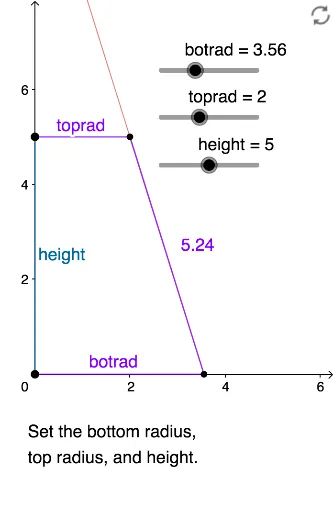
Loading the math board and drawing, please wait…
This example demonstrates how to generate the geometric shape of a lampshade by rotating a cone. It involves core mathematical concepts such as cones, cylinders, solid geometry, conditional probability, and expected value. The construction uses GeoGebra commands/objects like Intersect, Point, Segment, Circle, Ray, Rotate, CircleArc, and Angle. Suitable for high school and above students to learn and understand the construction of three-dimensional shapes and their related mathematical principles.
GeoGebra Commands & Parameters
Intersect(xAxis, yAxis) → APoint(Circle[A, botrad]) → BSegment(A, B) → fCircle(A, height) → cIntersect(c, yAxis, 2) → CPoint(Circle[C, toprad]) → DSegment(C, D) → gRay(B, D) → hSegment(B, D) → iIntersect(h, yAxis) → ECircle(E, A) → dPoint(d) → FRotate(F, α, E) → F'Rotate(F, (-α), E) → F'_1CircleArc(E, F'_1, F') → eSegment(E, F'_1) → jSegment(E, F') → kCircle(E, inrad) → pIntersect(p, j, 1) → HIntersect(p, k, 1) → IAngle(F'_1, E, F') → βRotate(F'_1, γ, E) → GRotate(G, γ, E) → G'Segment(E, G) → lSegment(E, G') → mIntersect(p, l, 1) → JIntersect(p, m, 1) → KRotate(F'_1, -2°, E) → LSegment(C, A) → n
AI Drawing Prompt Reference
Draw the geometric shape of a lampshade by rotating a cone. Start by marking the intersection of the x-axis and y-axis as point A, then draw a circle centered at A, intersecting the y-axis at point B and connecting AB. Next, draw a circle centered at A with the height as the radius, intersecting the y-axis at point C, and draw a circle centered at C, intersecting the y-axis at point D and connecting CD. Draw a ray h from B through D, and line segment BD. Find the intersection of h with the y-axis at point E, then draw a circle centered at E with the inner radius, intersecting the arc at H and I. Calculate the angle between F' and E, rotate F' to get G and G', and connect E to G and G'. Finally, rotate F'_1 to get point L, and connect C to A.
The prompt above was compiled from the original drawing commands and is for reference only.