
Lamborghini Turning Angles
Loading the math board and drawing, please wait…
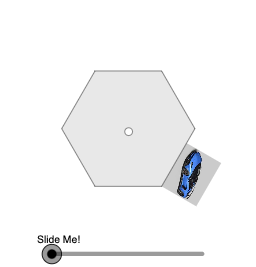
This example demonstrates the exterior angle theorem of polygons through geometric construction. Using commands like Polygon, Rotate, Dilate, Vector, and Translate, a polygon is constructed and its exterior angle sum property is illustrated by adjusting the vertex positions. Suitable for students at middle school level and above to learn polygon geometry.
GeoGebra Commands & Parameters
Intersect(xAxis, yAxis) → CPolygon(C, D, 6) → poly1, f, H, g, h, i, j, k, E, F, GRotate(pic1, pi / 3, D) → pic1'Dilate(D, If[0 < a ≤ 1, 1 - a, 0], E) → D'Vector(D, D') → uTranslate(pic1', u) → pic1''Ray(D, E) → lRotate(pic1'', If[1 < a ≤ 2, ((a - 1) * pi / 3), pi / 3], E) → pic1'''Dilate(E, If[2 < a ≤ 3, 3 - a, 0], F) → E'Vector(E, E') → vTranslate(pic1''', v) → pic2Rotate(I, pi / 3, D) → I'Translate(I', u) → I''Rotate(I'', If[1 < a ≤ 2, ((a - 1) * pi / 3), pi / 3], E) → I'''CircleSector(E, I'', I''') → cRotate(pic2, If[3 < a ≤ 4, ((a - 3) * pi / 3), pi / 3], E') → pic2'Translate(I''', v) → JRotate(J, If[3 < a ≤ 4, ((a - 3) * pi / 3), pi / 3], E') → J'CircleSector(F, J, J') → dDilate(E', If[4 < a ≤ 5, 5 - a, 0], G) → E''Vector(E', E'') → wTranslate(pic2', w) → pic2''Translate(J', w) → J''Ray(E, E') → mRotate(pic2'', If[5 < a ≤ 6, ((a - 5) * pi / 3), pi / 3], E'') → pic2'''Rotate(J'', If[5 < a ≤ 6, ((a - 5) * pi / 3), pi / 3], E'') → J'''CircleSector(G, J'', J''') → eRay(E', G) → nDilate(G, If[6 < a ≤ 7, 7 - a, 0], H) → G'Vector(G, G') → bTranslate(pic2''', b) → pic3Translate(J''', b) → KRotate(pic3, If[7 < a ≤ 8, ((a - 7) * pi / 3), pi / 3], H) → pic3'Rotate(K, If[7 < a ≤ 8, ((a - 7) * pi / 3), pi / 3], H) → K'CircleSector(H, K, K') → pRay(E'', H) → qDilate(H, If[8 < a ≤ 9, 9 - a, 0], C) → H'Vector(H, H') → rTranslate(pic3', r) → pic3''Translate(K', r) → K''Rotate(pic3'', If[9 < a ≤ 10, ((a - 9) * pi / 3), pi / 3], C) → pic3'''Rotate(K'', If[9 < a ≤ 10, ((a - 9) * pi / 3), pi / 3], C) → K'''CircleSector(C, K'', K''') → sRay(H, C) → tDilate(C, If[10 < a ≤ 11, 11 - a, 0], D) → C'Vector(C, C') → u_1Translate(pic3''', u_1) → pic4Translate(K''', u_1) → LRotate(pic4, If[11 < a ≤ 12, ((a - 11) * pi / 3), pi / 3], D) → pic4'Rotate(L, If[11 < a ≤ 12, ((a - 11) * pi / 3), pi / 3], D) → L'Ray(C, D) → f_1CircleSector(C', L, L') → c_1Segment(C, D) → g_1Segment(D, E) → h_1Segment(E, F) → i_1Segment(F, G) → j_1Segment(G, H) → k_1Segment(H, C) → l_1Dilate(C, If[13 < a ≤ 14, 14 - a, 0], M) → C'_{1}Dilate(H, If[13 < a ≤ 14, 14 - a, 0], M) → H'_{1}Dilate(G, If[13 < a ≤ 14, 14 - a, 0], M) → G'_{1}Dilate(F, If[13 < a ≤ 14, 14 - a, 0], M) → F'Dilate(E, If[13 < a ≤ 14, 14 - a, 0], M) → E'_{1}Dilate(D, If[13 < a ≤ 14, 14 - a, 0], M) → D'_{1}Vector(H, H'_{1}) → v_1Vector(C, C'_{1}) → w_1Vector(D, D'_{1}) → a_1Vector(E, E'_{1}) → b_1Vector(F, F') → d_1Vector(G, G'_{1}) → e_1Translate(p, v_1) → p'Translate(s, w_1) → s'Translate(c, b_1) → c'Translate(d, d_1) → d'Translate(e, e_1) → e'Translate(c_1, a_1) → p_1CircleArc(E, I'', I''') → q_1CircleArc(F, J, J') → r_1CircleArc(G, J'', J''') → s_1CircleArc(H, K, K') → t_1CircleArc(C, K'', K''') → c_2CircleArc(D, I, I') → d_2
AI Drawing Prompt Reference
In a Cartesian plane, use the intersection point of the x- and y-axes as the base. Construct a regular polygon with 6 vertices using this setup, and obtain its key vertices. Take one polygon vertex as a rotation center and, with a fixed incremental angle, successively rotate and translate the polygon to create a chain of exterior positions that reflect turning between consecutive vertices. At corresponding vertex pairs, draw circular sectors to represent the angles between the rotated rays, illustrating the exterior-angle construction step by step. Finally, draw rays from the relevant outer points back toward the polygon so the sequence of exterior angles is visually connected.
The prompt above was compiled from the original drawing commands and is for reference only.