
Kite Construction Template: Geometric and Function Drawing Example
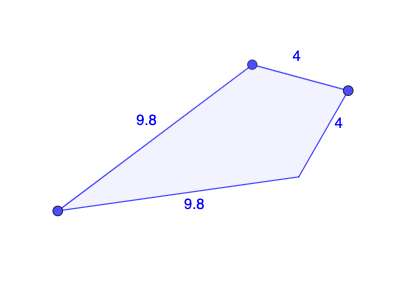
Loading the math board and drawing, please wait…
This example demonstrates constructing a kite shape using GeoGebra and analyzing its function graph. Key mathematical concepts include angles, lines, reflection, differential calculus, and tangent functions. Construction involves Polygon and Mirror commands with objects like A, B, C, t1, c, a, b, etc. Suitable for high school students or math enthusiasts learning geometric construction and function graphing.
GeoGebra Commands & Parameters
Polygon(A, B, C) → t1, c, a, bMirror(A, a) → A'Mirror(B, a) → B'Mirror(C, a) → C'Polygon(A', B', C') → t1', c', a', b'Polygon(B, A, C, A') → q1, b_1, a_1, c_1, f
AI Drawing Prompt Reference
Draw a kite-shaped polygon on the plane: start by placing three key points and connecting them to form the first polygon. Then choose a single reflection line as the symmetry baseline and mirror each of the three points across that same line to get the corresponding image points. Connect the mirrored points to form a second polygon on the opposite side. Finally, connect the original and mirrored points in the specified order to create the combined figure with additional edges, so that the two polygon parts fit together as a kite construction template.
The prompt above was compiled from the original drawing commands and is for reference only.