
Kite Area Practice by zaynabj
Loading the math board and drawing, please wait…
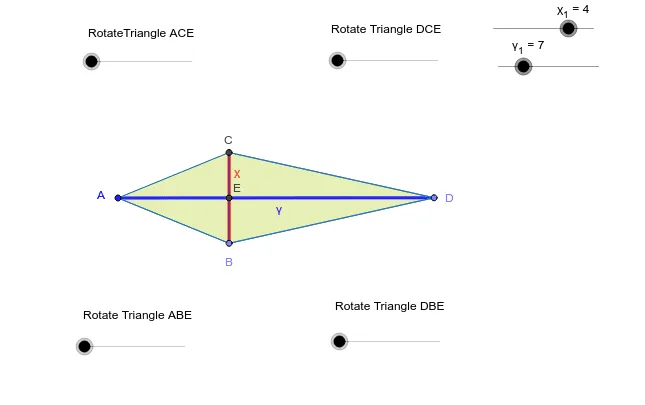
This example demonstrates how to calculate the area of a kite using geometric construction. Key mathematical concepts include the properties and area formula of a kite. GeoGebra commands such as Point, Segment, Polygon are used for construction. Suitable for middle school and above students for learning and practice.
GeoGebra Commands & Parameters
Point(Circle[A, χ_1]) → BSegment(A, B) → b_3Circle(A, B) → cPoint(Circle[B, γ_1]) → DSegment(B, D) → fCircle(D, B) → gIntersect(c, g, 1) → CSegment(A, C) → dSegment(C, D) → hSegment(A, D) → γSegment(B, C) → χIntersect(γ, χ) → E_1Polygon(C, E_1, D) → P, d_4, c_1, e_1Polygon(E_1, B, D) → Q, d_3, e_2, b_1Polygon(E_1, C, A) → R, a_1, e_3, c_2Polygon(E_1, B, A) → S, a_2, e_4, b_2Midpoint(C, D) → FMirror(C, F) → C'Mirror(E_1, F) → E'Mirror(D, F) → D'Midpoint(A, C) → GMidpoint(A, B) → HMidpoint(B, D) → IMirror(E_1, G) → E'_1Mirror(C, G) → C'_1Mirror(A, G) → A'Mirror(E_1, H) → E'_2Mirror(B, H) → B'Mirror(A, H) → A'_1Mirror(E_1, I) → E'_3Mirror(B, I) → B'_1Mirror(D, I) → D'_1Midpoint(B, C) → ERotate(E_1, α, G) → E_1'Rotate(C, α, G) → C'_2Rotate(A, α, G) → A'_2Polygon(E_1', C'_2, A'_2) → R', a'_2, e_1', c'_2Rotate(C, -β, F) → C'_4Rotate(E_1, -β, F) → E_3Rotate(D, -β, F) → D'_3Polygon(C'_4, E_3, D'_3) → P', d'_3, c'_4, e_5Rotate(E_1, γ_2, H) → E_2Rotate(B, γ_2, H) → B'_2Rotate(A, γ_2, H) → A'_3Polygon(E_2, B'_2, A'_3) → S', a'_3, e_6, b'_2Rotate(E_1, -δ, I) → E_4Rotate(B, -δ, I) → B'_3Rotate(D, -δ, I) → D'_2Polygon(E_4, B'_3, D'_2) → Q', d'_2, e_7, b'_3
AI Drawing Prompt Reference
Draw a kite to demonstrate the calculation of its area using geometric construction. Start by drawing two intersecting line segments, then use their intersection points and endpoints as centers to draw circles. Find the intersection points of these circles to form the vertices of the kite. Connect the vertices and intersection points to create four triangles. Next, reflect the kite's vertices and edges over the midpoints of the line segments to obtain symmetrical shapes. Finally, rotate parts of the kite to show its symmetry and the process of area calculation.
The prompt above was compiled from the original drawing commands and is for reference only.