
Deriving the Area of a Trapezium
Loading the math board and drawing, please wait…
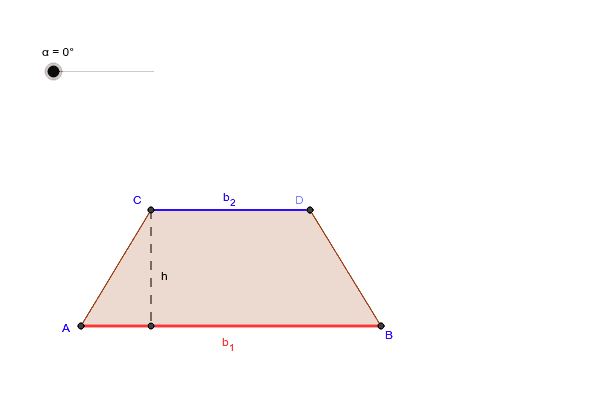
This worksheet demonstrates the derivation of the area formula for a trapezium through interactive exploration. Key math concepts include trapezium definition, properties of parallel lines, triangle area formula, and analytical geometry methods. Construction highlights the use of GeoGebra commands like Line, Point, Polygon, OrthogonalLine, Midpoint, Rotate, Intersect, and Segment, along with objects such as A, B, a, C, b, D, P, etc. Ideal for middle school and above students to grasp geometric derivations and spatial reasoning skills.
GeoGebra Commands & Parameters
Line(A, B) → aLine(C, a) → bPoint(b) → DPolygon(C, A, B, D) → P, c, a_1, b_1, dOrthogonalLine(C, a_1) → eMidpoint(B, D) → FRotate(C, -α, F) → C'Rotate(A, -α, F) → A'Rotate(B, -α, F) → B'Rotate(D, -α, F) → D'Polygon(C', A', B', D') → P', c', a', b', d'Intersect(a_1, a') → JPoint(d') → HPoint(a_1) → KIntersect(a_1, e) → ISegment(C, I) → gPoint(g) → L
AI Drawing Prompt Reference
Draw a trapezium and demonstrate the derivation of its area formula. Start by sketching the two parallel sides of the trapezium and connecting a point between them to form the trapezium. Then, locate the midpoint of the parallel sides and rotate a part of the trapezium around this midpoint to create a new trapezium. Identify key intersection points and segments within the new trapezium, and connect these points to illustrate the critical steps in the area derivation process.
The prompt above was compiled from the original drawing commands and is for reference only.