
Kite Area Practice
Loading the math board and drawing, please wait…
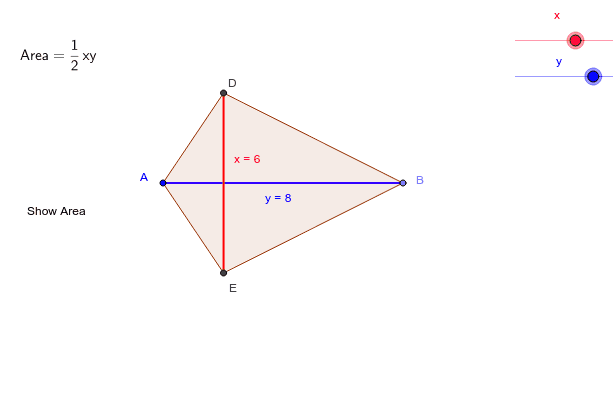
This example demonstrates how to calculate the area of a kite using GeoGebra. It involves core math concepts like diagonals, Pythagorean theorem, and area formulas. Construction uses commands and objects such as Point, Segment, OrthogonalLine, Circle, Intersect, Polygon, If. Suitable for middle school and above students for practicing geometric constructions and area calculations.
GeoGebra Commands & Parameters
Point(Circle[A, d_2]) → BSegment(A, B) → bPoint(b) → COrthogonalLine(C, b) → cCircle(C, χ) → eIntersect(e, c, 1) → DIntersect(e, c, 2) → ESegment(D, E) → fPolygon(D, A, E, B) → P, d_4, a_1, e_1, b_1If(χ_1 ≟ 1, F) → GPoint(f) → HPoint(b) → I
AI Drawing Prompt Reference
Draw a kite by intersecting two perpendicular lines at their midpoint, creating diagonals. Draw a circle with one diagonal as the diameter, find its intersections with the perpendicular lines, and connect these points to form the kite. Label the diagonals, sides, and include the area calculation steps.
The prompt above was compiled from the original drawing commands and is for reference only.