
Key Angles in the Unit Circle
Loading the math board and drawing, please wait…
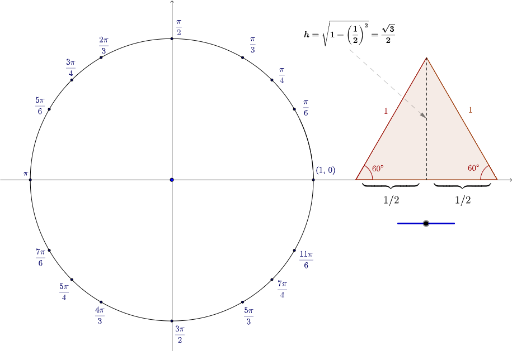
This example demonstrates the geometric representation and properties of key angles in the unit circle. It involves core mathematical concepts such as angles, circles, unit circles, line segments, orthocenters, and trigonometric functions. The construction highlights GeoGebra commands like Rotate, Point, Angle, Arc, Segment, Polygon, LineBisector, Midpoint, Intersect, and Vector. It is suitable for high school mathematics education, aiding in understanding the relationship between trigonometric functions and the unit circle, as well as geometric constructions.
GeoGebra Commands & Parameters
Rotate(Pi0, 1.5707963267948966) → Pi1Over2Rotate(Pi0, 1.0472) → Pi1Over3Rotate(Pi0, 0.7854) → Pi1Over4Rotate(Pi0, 0.5236) → Pi1Over6Rotate(Pi0, 2.0943951023931953) → Pi2Over3Rotate(Pi0, 2.356194490192345) → Pi3Over4Rotate(Pi0, 2.617993877991494) → Pi5Over6Rotate(Pi0, 3.141592653589793) → Pi1Over1Rotate(Pi0, 3.665191429188092) → Pi7Over6Rotate(Pi0, 3.9269908169872414) → Pi5Over4Rotate(Pi0, 4.1887902047863905) → Pi4Over3Rotate(Pi0, 4.71238898038469) → Pi3Over2Rotate(Pi0, 5.235987755982988) → Pi5Over3Rotate(Pi0, 5.497787143782138) → Pi7Over4Rotate(Pi0, 5.759586531581287) → Pi11Over6Point(unitCircle) → TAngle(T) → thetaArc(unitCircle, Pi0, T) → arcThetaPoint(unitCircle) → ASegment(O, A) → OAAngle(A, O, Pi1Over3) → AOTAngle(O, T, A) → OTA2Segment(A, T) → AT2Polygon(T1, T2, 3) → poly1, a, b, e, T3LineBisector(a) → cMidpoint(T1, T2) → BSegment(T3, B) → dIntersect(d, a) → CAngle(T3, C, T1) → αAngle(T2, C, T3) → βAngle(T2, T1, T3) → γSegment(A, Pi1Over3) → ATSegment(O, Pi1Over3) → OTMidpoint(OA) → B2Polygon(O, B2, Pi1Over3) → costriangle, pi1over3, o, b2Angle(T3, T2, T1) → δVector(Midpoint[Corner[text1, 1], Corner[text1, 2]], Midpoint[d]) → sinvector