
Isometry
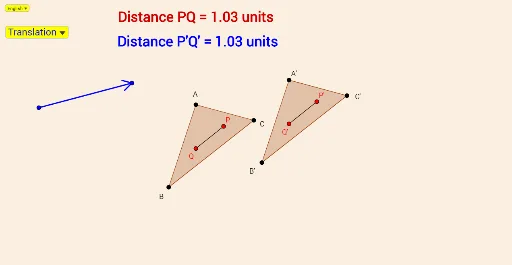
Loading the math board and drawing, please wait…
This example demonstrates the concept of isometry, which includes translation, rotation, reflection, and shearing. Using GeoGebra commands such as Translate, Rotate, Mirror, and Shear, it visually illustrates how these transformations preserve the size and shape of the figure. Suitable for students at the middle school level and above to learn about geometric transformations.
GeoGebra Commands & Parameters
SelectedIndex(Bahasa) → nnPolygon(A, B, C) → poly1, c, a, bPointIn(poly1) → PPointIn(poly1) → QIf(nn ≟ 1, {"Translation", "Reflection", "Rotation", "Transformation 4", "Transformation 5", "Transformation 6"}, {"Translasi", "Pantulan", "Putaran", "Transformasi 4", "Transformasi 5", "Transformasi 6"}) → TransformSelectedIndex(Transform) → mVector(G, H) → uTranslate(A, u) → A'Translate(B, u) → B'Translate(C, u) → C'Polygon(A', B', C') → poly1', c', a', b'Translate(P, u) → P'Translate(Q, u) → Q'Line(D, E) → fMirror(A, f) → A'_1Mirror(B, f) → B'_1Mirror(C, f) → C'_1Polygon(A'_1, B'_1, C'_1) → poly1'_1, c'_1, a'_1, b'_1Mirror(P, f) → P'_1Mirror(Q, f) → Q'_1Rotate(A, Ar°, F) → A'_2Rotate(B, Ar°, F) → B'_2Rotate(C, Ar°, F) → C'_2Polygon(A'_2, B'_2, C'_2) → poly1'_2, c'_2, a'_2, b'_2Rotate(P, Ar°, F) → P'_2Rotate(Q, Ar°, F) → Q'_2Dilate(A, Sf, K) → A'_3Dilate(B, Sf, K) → B'_3Dilate(C, Sf, K) → C'_3Polygon(A'_3, B'_3, C'_3) → poly1'_3, c'_3, a'_3, b'_3Dilate(P, Sf, K) → P'_3Dilate(Q, Sf, K) → Q'_3Line(L, M) → gShear(A, g, Sr) → A'_4Shear(B, g, Sr) → B'_4Shear(C, g, Sr) → C'_4Polygon(A'_4, B'_4, C'_4) → poly1'_4, c'_4, a'_4, b'_4Shear(P, g, Sr) → P'_4Shear(Q, g, Sr) → Q'_4Line(I, J) → hStretch(A, h, Str) → A'_5Stretch(B, h, Str) → B'_5Stretch(C, h, Str) → C'_5Polygon(A'_5, B'_5, C'_5) → poly1'_5, c'_5, a'_5, b'_5Stretch(P, h, Str) → P'_5Stretch(Q, h, Str) → Q'_5Segment(G, H) → iCircle(H, 0.3) → dIntersect(d, i, 1) → NRotate(N, 30°, H) → N'Rotate(N, (-(30°)), H) → N'_1Segment(H, N'_1) → jSegment(H, N') → kDistance(P, Q) → ODSegment(Q, P) → lSegment(P', Q') → nSegment(P'_1, Q'_1) → pSegment(P'_2, Q'_2) → qSegment(P'_3, Q'_3) → rSegment(P'_4, Q'_4) → sSegment(P'_5, Q'_5) → tIf(nn ≟ 1, "Distance ", "Jarak ") → Tex1If(nn ≟ 1, If[OD ≤ 1, " unit", " units"], " unit") → Tex2If(nn ≟ 1, If[Jr ≤ 1, " unit", " units"], " unit") → Tex3
AI Drawing Prompt Reference
Draw a triangle ABC, then perform translation, reflection, rotation, shear, and stretch transformations in sequence, generating new triangles after each transformation and showing the original and transformed points. First, translate triangle ABC to A'B'C', then reflect to A'_1B'_1C'_1, rotate to A'_2B'_2C'_2, shear to A'_4B'_4C'_4, and finally stretch to A'_5B'_5C'_5.
The prompt above was compiled from the original drawing commands and is for reference only.