
Islamic Geometric Pattern Symmetry Demo
Loading the math board and drawing, please wait…
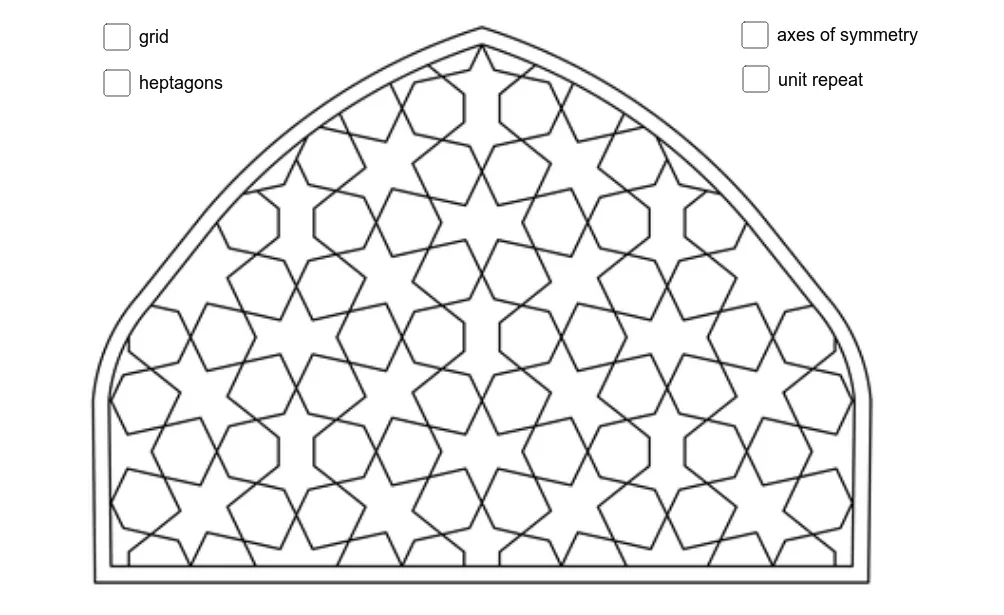
This example demonstrates the principles of symmetry in Islamic geometric patterns, involving core math concepts like symmetry, polygon construction, transformation, and integral. It uses commands like Polygon, Line, Point, Segment in GeoGebra for construction, suitable for high school students and math enthusiasts learning geometric drawing and pattern design.
GeoGebra Commands & Parameters
Polygon(E, F, 7) → veelhoek1, f, I, J, K, g, h, i, j, k, l, G, HPolygon(E_1, F_1, 7) → veelhoek1_1, f_1, I_1, J_1, K_1, g_1, h_1, i_1, j_1, k_1, l_1, G_1, H_1Polygon(E_2, F_2, 7) → veelhoek1_2, f_2, I_2, J_2, K_2, g_2, h_2, i_2, j_2, k_2, l_2, G_2, H_2Polygon(E_3, F_3, 7) → veelhoek1_3, f_3, I_3, J_3, K_3, g_3, h_3, i_3, j_3, k_3, l_3, G_3, H_3Polygon(E_4, F_4, 7) → veelhoek1_4, f_4, I_4, J_4, K_4, g_4, h_4, i_4, j_4, k_4, l_4, G_4, H_4Polygon(L, M, 7) → veelhoek2, m, P, Q, R, n, p, q, r, s, t, N, OPolygon(L_1, M_1, 7) → veelhoek2_1, m_1, P_1, Q_1, R_1, n_1, p_1, q_1, r_1, s_1, t_1, N_1, O_1Polygon(L_2, M_2, 7) → veelhoek2_2, m_2, P_2, Q_2, R_2, n_2, p_2, q_2, r_2, s_2, t_2, N_2, O_2Polygon(L_3, M_3, 7) → veelhoek2_3, m_3, P_3, Q_3, R_3, n_3, p_3, q_3, r_3, s_3, t_3, N_3, O_3Polygon(L_4, M_4, 7) → veelhoek2_4, m_4, P_4, Q_4, R_4, n_4, p_4, q_4, r_4, s_4, t_4, N_4, O_4Line(S, T) → aPoint(a) → UPoint(a) → VSegment(U, V) → bPolygon(W, Z, A_1, B_1) → vierhoek1, w, z_1, a_1, b_1
AI Drawing Prompt Reference
Draw an Islamic geometric pattern with four identical heptagons symmetrically arranged around a central point. Then draw the axes of symmetry for these heptagons and two line segments connecting the vertices of the heptagons to form a quadrilateral.
The prompt above was compiled from the original drawing commands and is for reference only.