
Investigating Properties of Right Triangles
Loading the math board and drawing, please wait…
In collections
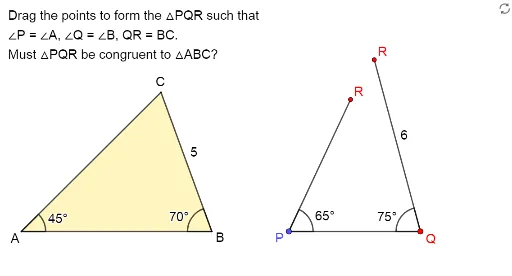
Exploring the Conditions for Congruence of 2 Triangles
Exploring Congruence of Triangles
This example demonstrates the properties of right triangles, involving key mathematical concepts such as the definition and properties of right triangles, and angle relationships. Using GeoGebra commands like Vector, Rotate, Union, etc., it dynamically shows the construction process of right triangles. Suitable for middle school and above students to learn geometric construction and transformations.
GeoGebra Commands & Parameters
Vector(A, C1) → uRotate(E - (5, 0), (-(70°)), E) → FUnion(Sequence[(x(A) + (Length[u] * cos(t°)), y(A) + (Length[u] * sin(t°))), t, 0, 355, 5], {G}) → VPointsPoint(Ray[A + (1, 0), A + (2, 0)]) → BDynamicCoordinates(C1, x(ClosestPoint[VPoints, C1]), y(ClosestPoint[VPoints, C1])) → CAngle(B, A, C) → βVector(B, C2) → vSequence((x(B) + (round(Length[v]) * cos(t°)), y(B) + (round(Length[v]) * sin(t°))), t, 0, 355, 5) → UPointsDynamicCoordinates(C2, x(ClosestPoint[UPoints, C2]), y(ClosestPoint[UPoints, C2])) → C'Angle(C', B, A) → δSegment(C', B) → hSegment(F, D) → kSegment(E, F) → jSegment(A, C) → fSegment(A, B) → gPolygon({A, B, C'}) → t1If(Distance[C, C'] < d, true, false) → closed1Segment(D, E) → iPolygon(D, E, F) → t3, l, m, nAngle(E, D, F) → αAngle(F, E, D) → γIf(B ≟ H, true, false) → reached
AI Drawing Prompt Reference
Draw a right triangle to demonstrate its key properties and vector relationships. Start by creating a vector, then rotate it to form a right angle. Connect the endpoints with dynamic coordinates and label the angles. Add auxiliary lines and triangles to show angle relationships and side length proportions. Finally, connect relevant points to form polygons, completing the geometric illustration.
The prompt above was compiled from the original drawing commands and is for reference only.