
Intersections and Area Calculation
Loading the math board and drawing, please wait…
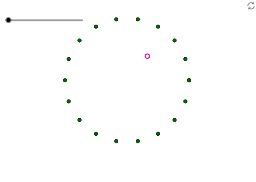
This example demonstrates how to calculate the intersection points between any two points within a polygon and the area formed by these intersections. It involves core mathematical concepts such as intersection calculations, area computation, coordinate geometry, properties of general quadrilaterals, natural numbers, and upper and lower sums or Riemann sums. The construction uses GeoGebra commands like Sequence, Point, Segment, and Intersect, along with objects like n, list1, A, B, a, C, D, b, G, H, d, I, J, e, K to create geometric figures. It is suitable for high school and above students to understand the geometric meaning of Riemann sums in calculus and methods for calculating polygonal areas.
GeoGebra Commands & Parameters
Sequence((cos(t), sin(t)), t, 0, (2 * π), ((2 * π)) / 18) → list1Point(list1) → APoint(list1) → BSegment(A, B) → aPoint(list1) → CPoint(list1) → DSegment(C, D) → bPoint(list1) → GPoint(list1) → HSegment(G, H) → dPoint(list1) → IPoint(list1) → JSegment(I, J) → eIntersect(a, b) → K
AI Drawing Prompt Reference
Draw a regular polygon with 18 vertices by dividing the circumference into 18 equal points. First, plot 18 points on the circumference, then connect these points to form the sides of the polygon. Next, find the intersection point K of sides a and b, and similarly find the intersection points of sides c and d, and sides e and f.
The prompt above was compiled from the original drawing commands and is for reference only.