
Intersection of Cylinder and Cos Surfaces
Loading the math board and drawing, please wait…
In collections
intersection: surface-surface, curve-curve
intersection: surface-surface, curve-curve
intersection: surface-surface, curve-curve
intersection: surface-surface, curve-curve
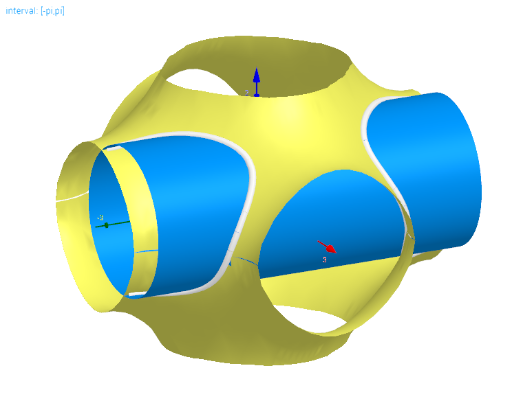
This example demonstrates the intersection of a cylinder and cosine surfaces in the interval [-π, π]. Key mathematical concepts include surface intersection and trigonometric functions. Constructed using GeoGebra commands like Sequence, Textfield, and InputBox, it is suitable for high school mathematics education.
GeoGebra Commands & Parameters
Textfield(x0) → InputBox1Textfield(y0) → InputBox2Sequence((i * acos((-cos(x)) - cos(y))), i, -1, 1, 2) → l_fTextfield(z0) → InputBox3Sequence(CurveCartesian[t, (i * acos((-cos(f1(t))) - cos(t))), f1(t), t, (-t_{max}), t_{max}], i, -1, 1, 2) → l1Sequence(CurveCartesian[t, (i * acos((-cos(f2(t))) - cos(t))), f2(t), t, (-t_{max}), t_{max}], i, -1, 1, 2) → l2Sequence(CurveCartesian[x0, (i * acos((-cos(f1(t))) - cos(t))), f1(t), t, (-t_{max}), t_{max}], i, -1, 1, 2) → l1_{x}Sequence(CurveCartesian[t, y0, f1(t), t, (-t_{max}), t_{max}], i, -1, 1, 2) → l1_{y}Sequence(CurveCartesian[t, (i * acos((-cos(f1(t))) - cos(t))), z0, t, (-t_{max}), t_{max}], i, -1, 1, 2) → l1_{z}Sequence(CurveCartesian[x0, (i * acos((-cos(f2(t))) - cos(t))), f2(t), t, (-t_{max}), t_{max}], i, -1, 1, 2) → l2_{x}Sequence(CurveCartesian[t, y0, f2(t), t, (-t_{max}), t_{max}], i, -1, 1, 2) → l2_{y}Sequence(CurveCartesian[t, (i * acos((-cos(f2(t))) - cos(t))), z0, t, (-t_{max}), t_{max}], i, -1, 1, 2) → l2_{z}
AI Drawing Prompt Reference
Draw the intersection of a cylinder and cosine surfaces in the interval [-π, π]. First, input the offsets for the x-axis, y-axis, and z-axis of the cylinder. Then, based on these offsets, draw two cosine surfaces, each with positive and negative branches. Finally, draw the projections of each surface on the x-axis, y-axis, and z-axis.
The prompt above was compiled from the original drawing commands and is for reference only.