
Intersection Area and Partial Volume in 2D
Loading the math board and drawing, please wait…
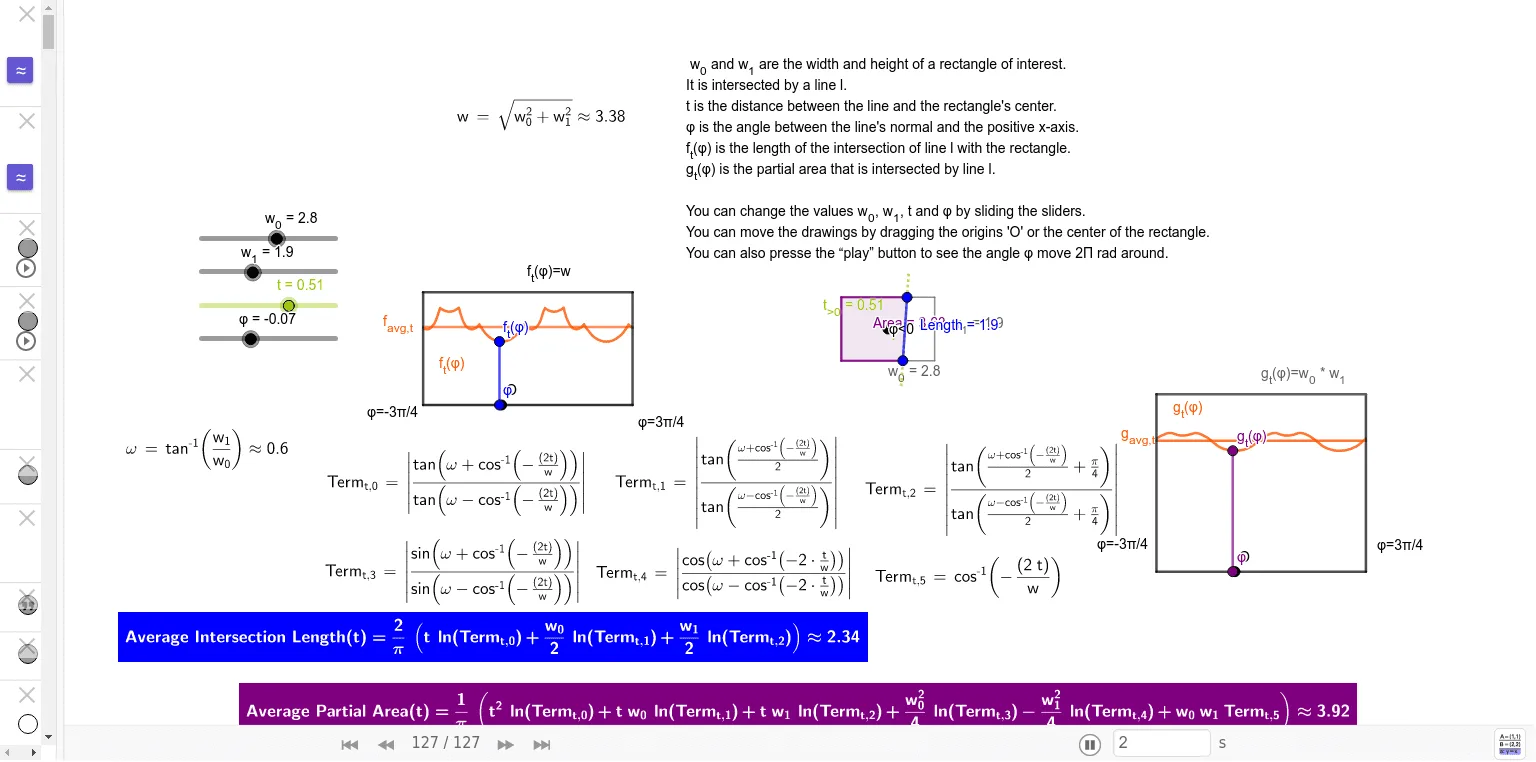
This example demonstrates the intersection area and partial volume in a 2D space. Key mathematical concepts include intersection, area, and volume. Using GeoGebra commands such as Segment, Intersect, and Polygon, complex geometric shapes can be constructed. Suitable for high school mathematics education and learning, particularly in coordinate geometry and calculus.
GeoGebra Commands & Parameters
Segment(V_{--}, V_{+-}) → E_{b}Segment(V_{+-}, V_{++}) → E_{r}Segment(V_{++}, V_{-+}) → E_tSegment(V_{-+}, V_{--}) → E_lSegment(P_1, P_0) → E_{P01}Segment(C, P) → t_{<0}Segment(C, P) → t_{>0}Angle(A, C, If[t > 0, P, (3 * C) - (2 * P)]) → αAngle(If[t > 0, P, (3 * C) - (2 * P)], C, A) → βIntersect(E_{P01}, E_{b}) → I_{b}Intersect(E_{P01}, E_{r}) → I_{r}Intersect(E_{P01}, E_t) → I_{t}Intersect(E_{P01}, E_l) → I_{l}Segment(I_{b}, I_{t}) → lSegment(I_{l}, I_{r}) → mSegment(I_{b}, I_{r}) → nSegment(I_{r}, I_{t}) → pSegment(I_{t}, I_{l}) → qSegment(I_{l}, I_{b}) → rPolygon(V_{--}, I_{b}, I_{t}, V_{-+}) → q1, v_{--}, i_{b}, i_{t}, v_{-+}Polygon(V_{--}, V_{+-}, I_{r}, I_{t}, V_{-+}) → poly2, v_1, v_{+-}, i_{r}, i_1, v_2Polygon(V_{--}, V_{+-}, I_{r}, I_{l}) → q2, v_3, v_4, i_2, i_{l}Polygon(V_{--}, V_{+-}, V_{++}, I_{t}, I_{l}) → poly1, v_5, v_6, v_{++}, i_3, i_4Polygon(I_{b}, V_{+-}, V_{++}, I_{t}) → q3, i_5, v_7, v_8, i_6Polygon(I_{b}, V_{+-}, V_{++}, V_{-+}, I_{l}) → poly3, i_7, v_9, v_{10}, v_{11}, i_8Polygon(V_{--}, I_{b}, I_{r}, V_{++}, V_{-+}) → poly4, v_{12}, i_9, i_{10}, v_{13}, v_{14}Polygon(I_{r}, V_{++}, V_{-+}, I_{l}) → q4, i_{11}, v_{15}, v_{16}, i_{12}Polygon(I_{b}, V_{+-}, I_{r}) → t1, i_{13}, i_{14}, v_{17}Polygon(I_{r}, V_{++}, I_{t}) → t2, i_{15}, i_{16}, v_{18}Polygon(I_{t}, V_{-+}, I_{l}) → t3, i_{17}, i_{18}, v_{19}Polygon(V_{--}, I_{b}, I_{l}) → t4, i_{19}, v_{20}, i_{20}Polygon(V_{--}, V_{+-}, V_{++}, V_{-+}) → q5, v_{21}, v_{22}, v_{23}, v_{24}LaTeX(Term_{t,0}, false, true) → TextTerm_{0}LaTeX(Term_{t,1}, false, true) → TextTerm_{1}LaTeX(Term_{t,2}, false, true) → TextTerm_{2}LaTeX(Term_{t,3}, false, true) → TextTerm_{3}LaTeX(Term_{t,4}, false, true) → TextTerm_{4}LaTeX(Term_{t,5}, false, true) → TextTerm_{5}Segment(P_{--}, P_{+-}) → E_{x-}Segment(P_{+-}, P_{++}) → E_{+x}Segment(P_{++}, P_{-+}) → E_{x+}Segment(P_{-+}, P_{--}) → E_{-x}Segment((φ, 0), (φ, (2 * t_{max}))) → s_φSegment(Q_{--}, Q_{+-}) → F_{x-}Segment(Q_{+-}, Q_{++}) → F_{+x}Segment(Q_{++}, Q_{-+}) → F_{x+}Segment(Q_{-+}, Q_{--}) → F_{-x}Segment(O_{g} + (φ, 0), Result_{g}) → fIf(Defined[l], Length[l], If[Defined[m], Length[m], If[Defined[n], Length[n], If[Defined[p], Length[p], If[Defined[q], Length[q], If[Defined[r], Length[r], "Error"]]]]]) → LengthCheckSegment(O_{f} + (φ, 0), Result_{f}) → s
AI Drawing Prompt Reference
Draw a 2D geometric shape with four edges E_b, E_r, E_t, and E_l, and their intersection points I_b, I_r, I_t, and I_l. Construct multiple quadrilaterals such as q1, poly2, q2, etc., using these intersection points. Finally, connect these quadrilaterals to form a complex geometric area. Pay attention to the definitions of angles α and β, and how to construct line segments l, m, n, p, and q using the intersection points.
The prompt above was compiled from the original drawing commands and is for reference only.