
Intersection Area and Partial Volume in 2D by Ron van den Burg (2)
Loading the math board and drawing, please wait…
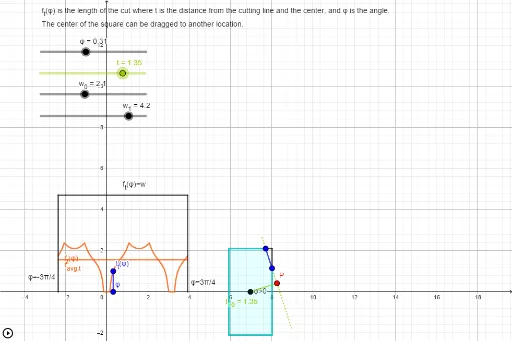
This example demonstrates the calculation of the intersection area and partial volume of two shapes in a 2D plane. Key math concepts include area calculation, intersection, volume concepts, curve sketching, tangent lines, general quadrilaterals, ellipses, and matrix operations. The construction uses GeoGebra commands like Segment, Intersect, Polygon, If, and Angle, along with objects such as φ_{max}, w_{0}, w_{1}, w, ω, C, V_{--}, V_{+-}, V_{-+}, V_{++}, E_{b}, E_{r}, E_t, E_l, t_{max}, t, φ_{min}, φ, φ_{left}, φ_{right}, P, P_0, P_1, E_{P01}, t_{<0}, t_{>0}, A, P_{--}, P_{+-}, P_{++}, P_{-+}, E_{x-}, E_{+x}, E_{x+}, E_{-x}, f_{--}, f_{+-}, f_{-+}, f_{++}, f_{t}. It is suitable for high school and above students learning geometric intersections, volume calculations, and parametric graphing with GeoGebra.
GeoGebra Commands & Parameters
Segment(V_{--}, V_{+-}) → E_{b}Segment(V_{+-}, V_{++}) → E_{r}Segment(V_{++}, V_{-+}) → E_tSegment(V_{-+}, V_{--}) → E_lSegment(P_1, P_0) → E_{P01}Segment(C, P) → t_{<0}Segment(C, P) → t_{>0}Segment(P_{--}, P_{+-}) → E_{x-}Segment(P_{+-}, P_{++}) → E_{+x}Segment(P_{++}, P_{-+}) → E_{x+}Segment(P_{-+}, P_{--}) → E_{-x}Intersect(f_{--}, k, (0.3138055098076551, 10.214635073645745)) → I_{--}Intersect(f_{+-}, k, (0.3138055098076551, -3.411484981784172)) → I_{+-}Intersect(f_{-+}, k, (0.3138055098076551, -5.7990009979994435)) → I_{-+}Intersect(f_{++}, k, (0.3138055098076551, 0)) → I_{++}Intersect(f_{t}, k, (0.3138055098076551, 1.0041490938621296)) → ResultSegment((φ, 0), (φ, (2 * t_{max}))) → s_φIntersect(E_{P01}, E_{b}) → I_{b}Intersect(E_{P01}, E_{r}) → I_{r}Intersect(E_{P01}, E_t) → I_{t}Intersect(E_{P01}, E_l) → I_{l}Segment(I_{b}, I_{t}) → lSegment(I_{l}, I_{r}) → mSegment(I_{b}, I_{r}) → nSegment(I_{r}, I_{t}) → pSegment(I_{t}, I_{l}) → qSegment(I_{l}, I_{b}) → rPolygon(V_{--}, I_{b}, I_{t}, V_{-+}) → q1, v_{--}, i_{b}, i_{t}, v_{-+}Polygon(V_{--}, V_{+-}, I_{r}, I_{t}, V_{-+}) → poly2, v_1, v_{+-}, i_{r}, i_1, v_2Polygon(V_{--}, V_{+-}, I_{r}, I_{l}) → q2, v_3, v_4, i_2, i_{l}Polygon(V_{--}, V_{+-}, V_{++}, I_{t}, I_{l}) → poly1, v_5, v_6, v_{++}, i_3, i_4Polygon(I_{b}, V_{+-}, V_{++}, I_{t}) → q3, i_5, v_7, v_8, i_6Polygon(I_{b}, V_{+-}, V_{++}, V_{-+}, I_{l}) → poly3, i_7, v_9, v_{10}, v_{11}, i_8Polygon(V_{--}, I_{b}, I_{r}, V_{++}, V_{-+}) → poly4, v_{12}, i_9, i_{10}, v_{13}, v_{14}Polygon(I_{r}, V_{++}, V_{-+}, I_{l}) → q4, i_{11}, v_{15}, v_{16}, i_{12}Polygon(I_{b}, V_{+-}, I_{r}) → t1, i_{13}, i_{14}, v_{17}Polygon(I_{r}, V_{++}, I_{t}) → t2, i_{15}, i_{16}, v_{18}Polygon(I_{t}, V_{-+}, I_{l}) → t3, i_{17}, i_{18}, v_{19}Polygon(V_{--}, I_{b}, I_{l}) → t4, i_{19}, v_{20}, i_{20}Polygon(V_{--}, V_{+-}, V_{++}, V_{-+}) → q5, v_{21}, v_{22}, v_{23}, v_{24}If(Defined[l], Length[l], If[Defined[m], Length[m], If[Defined[n], Length[n], If[Defined[p], Length[p], If[Defined[q], Length[q], If[Defined[r], Length[r], "Error"]]]]]) → LengthCheckSegment(B, Result) → sAngle(A, C, If[t > 0, P, (3 * C) - (2 * P)]) → αAngle(If[t > 0, P, (3 * C) - (2 * P)], C, A) → β
AI Drawing Prompt Reference
Draw the intersection area and partial volume of two shapes in a 2D plane. Start by sketching four sides and a line connecting two points, then find the intersections of five curves with a horizontal line and connect them to form multiple polygons. Calculate the area of these polygons and label key points and segments. Finally, draw the outline and shaded regions of the shapes to show their intersection and volume.
The prompt above was compiled from the original drawing commands and is for reference only.