
Intersection Area and Partial Volume in 2D by Ron van den Burg (3)
Loading the math board and drawing, please wait…
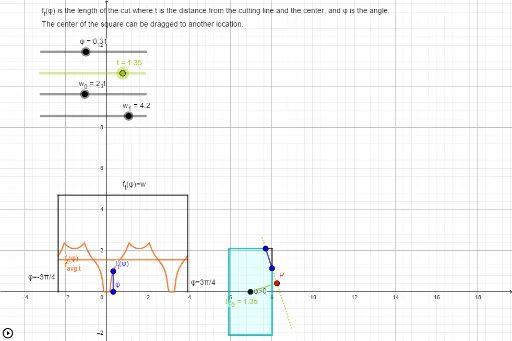
This example demonstrates the intersection area and partial volume in a 2D space. Key concepts include intersection, area, and volume. Using GeoGebra commands such as Segment, Intersect, and Polygon, complex geometric shapes can be constructed. Suitable for high school math education and learning.
GeoGebra Commands & Parameters
Segment(V_{--}, V_{+-}) → E_{b}Segment(V_{+-}, V_{++}) → E_{r}Segment(V_{++}, V_{-+}) → E_tSegment(V_{-+}, V_{--}) → E_lSegment(P_1, P_0) → E_{P01}Segment(C, P) → t_{<0}Segment(C, P) → t_{>0}Segment(P_{--}, P_{+-}) → E_{x-}Segment(P_{+-}, P_{++}) → E_{+x}Segment(P_{++}, P_{-+}) → E_{x+}Segment(P_{-+}, P_{--}) → E_{-x}Intersect(f_{--}, k, (0.3138055098076551, 10.214635073645745)) → I_{--}Intersect(f_{+-}, k, (0.3138055098076551, -3.411484981784172)) → I_{+-}Intersect(f_{-+}, k, (0.3138055098076551, -5.7990009979994435)) → I_{-+}Intersect(f_{++}, k, (0.3138055098076551, 0)) → I_{++}Intersect(f_{t}, k, (0.3138055098076551, 1.0041490938621296)) → ResultSegment((φ, 0), (φ, (2 * t_{max}))) → s_φIntersect(E_{P01}, E_{b}) → I_{b}Intersect(E_{P01}, E_{r}) → I_{r}Intersect(E_{P01}, E_t) → I_{t}Intersect(E_{P01}, E_l) → I_{l}Segment(I_{b}, I_{t}) → lSegment(I_{l}, I_{r}) → mSegment(I_{b}, I_{r}) → nSegment(I_{r}, I_{t}) → pSegment(I_{t}, I_{l}) → qSegment(I_{l}, I_{b}) → rPolygon(V_{--}, I_{b}, I_{t}, V_{-+}) → q1, v_{--}, i_{b}, i_{t}, v_{-+}Polygon(V_{--}, V_{+-}, I_{r}, I_{t}, V_{-+}) → poly2, v_1, v_{+-}, i_{r}, i_1, v_2Polygon(V_{--}, V_{+-}, I_{r}, I_{l}) → q2, v_3, v_4, i_2, i_{l}Polygon(V_{--}, V_{+-}, V_{++}, I_{t}, I_{l}) → poly1, v_5, v_6, v_{++}, i_3, i_4Polygon(I_{b}, V_{+-}, V_{++}, I_{t}) → q3, i_5, v_7, v_8, i_6Polygon(I_{b}, V_{+-}, V_{++}, V_{-+}, I_{l}) → poly3, i_7, v_9, v_{10}, v_{11}, i_8Polygon(V_{--}, I_{b}, I_{r}, V_{++}, V_{-+}) → poly4, v_{12}, i_9, i_{10}, v_{13}, v_{14}Polygon(I_{r}, V_{++}, V_{-+}, I_{l}) → q4, i_{11}, v_{15}, v_{16}, i_{12}Polygon(I_{b}, V_{+-}, I_{r}) → t1, i_{13}, i_{14}, v_{17}Polygon(I_{r}, V_{++}, I_{t}) → t2, i_{15}, i_{16}, v_{18}Polygon(I_{t}, V_{-+}, I_{l}) → t3, i_{17}, i_{18}, v_{19}Polygon(V_{--}, I_{b}, I_{l}) → t4, i_{19}, v_{20}, i_{20}Polygon(V_{--}, V_{+-}, V_{++}, V_{-+}) → q5, v_{21}, v_{22}, v_{23}, v_{24}If(Defined[l], Length[l], If[Defined[m], Length[m], If[Defined[n], Length[n], If[Defined[p], Length[p], If[Defined[q], Length[q], If[Defined[r], Length[r], "Error"]]]]]) → LengthCheckSegment(B, Result) → sAngle(A, C, If[t > 0, P, (3 * C) - (2 * P)]) → αAngle(If[t > 0, P, (3 * C) - (2 * P)], C, A) → β
AI Drawing Prompt Reference
Draw a complex geometric shape in a 2D coordinate system to demonstrate intersection area and volume. Start by creating a basic framework with four horizontal and two vertical line segments. Then, connect the intersection points of these segments with curves to form multiple polygons. Next, draw lines connecting the intersection points of these polygons to highlight the internal structure. The final shape should consist of several intersecting polygons, clearly showing the areas of intersection, area, and volume.
The prompt above was compiled from the original drawing commands and is for reference only.