
Interactive Solver for Unknown Adjacent Angles
Loading the math board and drawing, please wait…
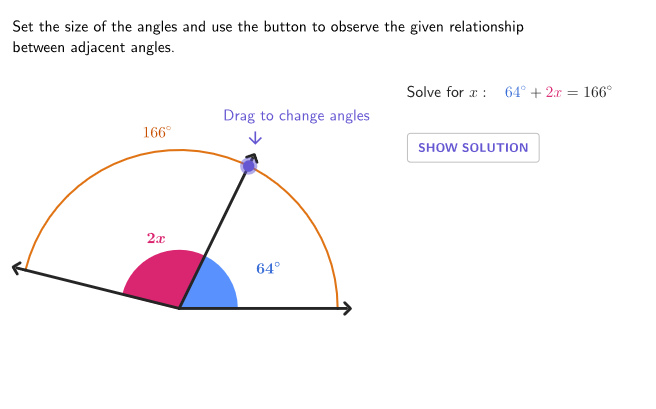
This interactive GeoGebra lesson demonstrates how to determine the measure of an unknown adjacent angle given specific angle conditions. It focuses on key angle relationships such as adjacent angles, linear pairs, and how supplementary/complementary angle facts can be used to form equations whose solution yields the unknown angle. Construction-wise, it builds the angle configuration using Angle together with points and rays (Point, UnitVector, Segment), uses Sequence and RandomElement to control steps and/or randomize parameters, employs Circle and CircleArc (with circlePixels) for arc/mark visualization, and uses Length for reading or validating constructed quantities. The workflow is presented through on-canvas text prompts and solution displays (textQuestion, textBeta, textGamma, textSolution) with buttons for solving and resetting (btnSol, btnNew, btnReset, showSolution). Suitable for grades 6–8 and for classroom practice on angle properties and solving for unknowns.
GeoGebra Commands & Parameters
Intersect(xAxis, yAxis) → ASequence((x(B); t), t, 100°, 179°, 1°) → allBigRandomElement(allBig) → B'Sequence((x(B); t), t, 0°, arg(B'), 1°) → pGridPoint(pGrid) → PAngle(P, A, B') → γAngle(B, A, P) → βUnitVector(AngularBisector[P, A, (-B)]) → versPinkSegment(A, P) → sidePSegment(A, B) → rightScirclePixels(P, 7 + (7 * pulsing), Corner[1], Corner[3], Corner[5]) → pulsingObjectSegment(A, B') → leftSCircleArc(A, B, B') → cLength(pGrid) → lenPGridSegment(B', B' + (0.5 * UnitVector[leftS])) → tipBPSegment(B, B + (0.5 * UnitVector[rightS])) → tipRightSSegment(P, P + (0.5 * UnitVector[sideP])) → tipP
AI Drawing Prompt Reference
Draw a coordinate system with an x-axis and y-axis. In the first quadrant, generate a random point and draw a ray from the origin to this point. Create an adjacent angle with the ray and the positive x-axis, where the angle measure is randomly selected between 100° and 179°. Draw an arc inside this angle as a mark. Connect the origin to the two vertices of the angle with two line segments. Add small arrows to the ends of the line segments and a pulsing circle inside the angle. Display the measures of the angle and the adjacent angle, and label the lengths of the line segments.
The prompt above was compiled from the original drawing commands and is for reference only.