
Interactive Parametric Curves Exploration
Loading the math board and drawing, please wait…
In collections
MATH1052-edX
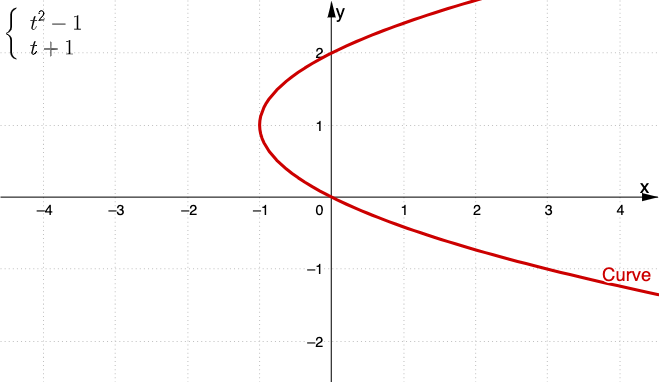
① This GeoGebra example demonstrates how parametric curves are generated dynamically, allowing users to input different parametric equations and observe the resulting shapes in real time. ② Core mathematical concepts include parametric equations, plane curves, coordinate transformations, and the influence of the parameter t on the curve's trajectory, bridging function graphing and coordinate geometry. ③ Construction highlights: Textfield objects (inp1, inp2) capture user input for the parametric formulas; the CurveCartesian command plots the curve (curve); a button (botón1) triggers updates; additional objects include points A and B, text1, and pic1, likely for labeling or visual aids. ④ Suitable for high school to early college students, this interactive tool aids in understanding parametric equations and curve sketching, and serves as an effective classroom demonstration for comparing different parameterizations.
GeoGebra Commands & Parameters
Textfield(f) → inp1Textfield(g) → inp2CurveCartesian(f(u), g(u), u, -1000, 1000) → curve
AI Drawing Prompt Reference
Draw a dynamic curve generated by parametric equations. Users can input different parametric equations in text boxes and trigger updates with a button. The curve changes in real time to show the influence of the parameter t on the trajectory. Include text boxes for input and a button for updates. Also add points A and B for labeling to help understand the shape of the curve.
The prompt above was compiled from the original drawing commands and is for reference only.