
Interactive Inscribed Angle Theorem Discovery
Loading the math board and drawing, please wait…
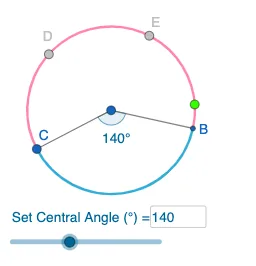
This GeoGebra example dynamically demonstrates the Inscribed Angle Theorem: an inscribed angle equals half the measure of the central angle subtending the same arc. Key math concepts include inscribed angles, central angles, arc relationships, and angle invariance. Construction uses Circle, Point, Rotate, Angle, CircleArc, Segment commands with Textfield and InputBox for interactivity. Ideal for middle school students' independent exploration or classroom demonstration, helping learners intuitively understand the quantitative relationship between inscribed and central angles while developing geometric intuition and reasoning skills.
GeoGebra Commands & Parameters
Circle(A, B_1) → cPoint(c) → CRotate(C, (a * pi / 180), A) → BAngle(C, A, B) → αCircleArc(A, C, B) → dCircleArc(A, B, C) → eSegment(A, C) → fSegment(A, B) → gPoint(e) → DPoint(e) → ETextfield(a) → InputBox1
AI Drawing Prompt Reference
Draw a circle and place two points A and B on it, then connect them to form chord AB. Rotate point B around point A by an angle a (controlled by an input box) to get point B'. Connect point A and point B' to form chord AB'. Choose point C on the circle and connect point A and point C to form chord AC. Find the central angle and inscribed angle corresponding to arc AC, denoted as arc d and angle α respectively. Adjust angle a and observe the relationship between angle α and the central angle to verify the Inscribed Angle Theorem: an inscribed angle equals half the measure of the central angle subtending the same arc.
The prompt above was compiled from the original drawing commands and is for reference only.