
Arc Measures/Intersections (Interior,Edge)
Loading the math board and drawing, please wait…
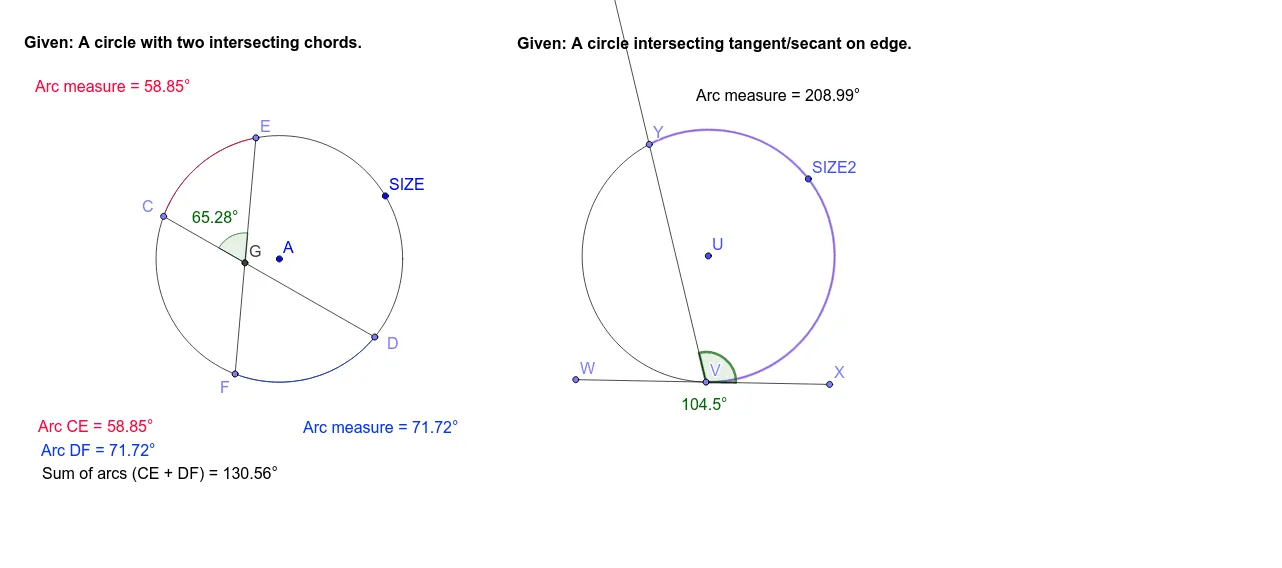
This example demonstrates the measurement and intersection of arcs in a circle, including interior and edge intersections. It involves core mathematical concepts such as angles, circles, geometry, intersections, median values, boxplots, squares, and similarity transformations. The construction uses GeoGebra commands like Circle, Point, Segment, Angle, Intersect, CircleArc, OrthogonalLine, and Ray. Suitable for high school mathematics teaching, focusing on geometric constructions and transformations.
GeoGebra Commands & Parameters
Circle(A, SIZE) → cPoint(c) → CPoint(c) → DSegment(C, D) → aPoint(c) → EPoint(c) → FSegment(E, F) → bAngle(E, A, C) → αAngle(F, A, D) → βIntersect(a, b) → GAngle(E, G, C) → γCircleArc(A, E, C) → dCircleArc(A, F, D) → eCircle(U, SIZE2) → fPoint(f) → VSegment(U, V) → gOrthogonalLine(V, g) → hPoint(h) → WPoint(h) → XSegment(W, X) → iPoint(f) → YRay(V, Y) → jAngle(X, V, Y) → εAngle(V, U, Y) → ζCircleArc(U, V, Y) → k
AI Drawing Prompt Reference
Draw a circle and select two points on it to form a line segment. Do the same with another two points to form a second line segment. Measure the angle between these segments and draw arcs from the center of the circle through the points that subtend these angles. Then, draw a circle centered at another point on the circle, intersect it with the previous segments, and connect the intersection points. Draw a perpendicular line from one intersection point, extend it outward, and finally draw an arc from the intersection point along the perpendicular line.
The prompt above was compiled from the original drawing commands and is for reference only.