
Lengths in Circles: Secant and Tangent
Loading the math board and drawing, please wait…
In collections
Segment Lengths in Circles - Exploration
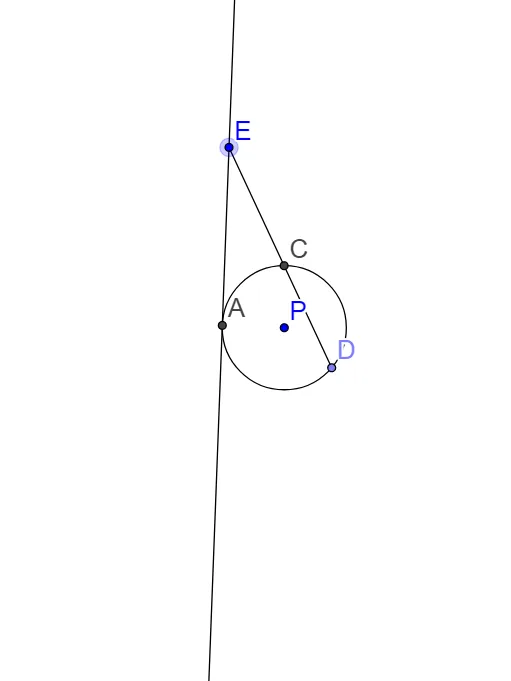
①This example demonstrates the geometric relationship between the lengths of a secant and a tangent drawn from an external point to a circle, visually illustrating the tangent-secant power theorem. ②Core mathematical concepts include tangent lines, secant lines, the power of a point, similar triangles, and proportional segment lengths, emphasizing that the square of the tangent length equals the product of the secant's external and total segments. ③Construction details: using GeoGebra commands such as Circle, Point, Segment, Intersect, Distance, and Tangent, the construction creates a circle c, an external point P, a tangent point E, and secant intersections D and C, then measures lengths like ED, EC, and EB; dragging P dynamically updates the values. ④Suitable for high school geometry classes or self-study, this interactive model helps verify the circle power theorem and serves as a dynamic geometry teaching resource.
GeoGebra Commands & Parameters
Circle(P, 3) → cPoint(c) → DSegment(E, D) → bIntersect(c, b, 2) → CDistance(E, C) → ECDistance(E, D) → EDTangent(E, c) → d, eIntersect(c, d, 1) → ADistance(A, E) → AEDistance(C, D) → CD
AI Drawing Prompt Reference
Create a geometric diagram with a circle and an external point P. Draw a secant line through P that intersects the circle at two points, C (near the external point) and D (the other intersection). Also construct a tangent from the same external point to the circle, touching it at E. Include the key segments and length measures such as EC, ED, and CD, and mark the distance from A to E if A is used as the point on the tangent line. Arrange the scene so that P can be dragged and the measured lengths update accordingly.
The prompt above was compiled from the original drawing commands and is for reference only.