
Interactive Function Tangent Line Practice with Derivatives
Loading the math board and drawing, please wait…
In collections
MATH1052-edX
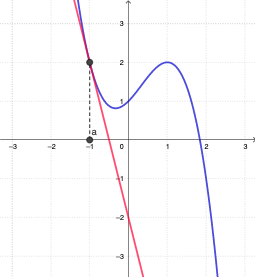
This example demonstrates how to construct a tangent line to a function at a chosen point and then verify whether the proposed line is the correct tangent using derivative information and geometric conditions. The key math concepts are the derivative as the slope of the tangent line, local linear approximation at the point of tangency, and the tangent condition that the line matches the curve’s direction at the contact point. Construction focuses on GeoGebra commands and interactive objects: Tangent is used to create the tangent line element (e.g., L); Derivative provides the slope information; Textfield and InputBox objects collect user inputs such as the point (a) and check parameters; If supports conditional logic for automated checking (e.g., checkTangent / checkDeriv); Segment and related visual elements display the tangent segment and the relevant geometric setup. Suitable for high school to early college students learning derivatives and tangent line interpretation.
GeoGebra Commands & Parameters
Element(L, 1) → fTangent(A, f) → tangTextfield(g) → InputBox1Textfield(auser) → InputBox2Derivative(f) → f'If(g ≟ f', true, false) → checkDerivIf(auser ≟ adf, true, false) → checkauserIf(tang ≟ tangUser, true, false) → checkTangentTextfield(tangUser) → InputBox3If((¬checkDeriv) ∧ (¬checkauser) ∧ (¬checkTangent), "all your inputs", If[(¬checkDeriv) ∧ checkauser ∧ checkTangent, "input 1", If[checkDeriv ∧ (¬checkauser) ∧ checkTangent, "input 2", If[checkDeriv ∧ checkauser ∧ (¬checkTangent), "input 3", If[(¬checkDeriv) ∧ (¬checkauser) ∧ checkTangent, "inputs 1 & 2", If[checkDeriv ∧ (¬checkauser) ∧ (¬checkTangent), "inputs 2 & 3", If[(¬checkDeriv) ∧ checkauser ∧ (¬checkTangent), "inputs 1 & 3"]]]]]]) → valBoolSegment(A, B) → s
AI Drawing Prompt Reference
Create a coordinate-plane graph of a function curve. Choose a point on the curve (entered by the user) and draw the tangent line at that point. Include a visual representation of the derivative information that gives the slope of the tangent, and compare it to the user’s proposed slope/line to check whether the tangent condition matches. Provide input fields for the tangency point parameter and a candidate tangent line/slope, and display which inputs are correct via a conditional message. Add a highlighted segment that emphasizes the tangent line geometry.
The prompt above was compiled from the original drawing commands and is for reference only.