
Interactive Function Composition with Vector Sequences
Loading the math board and drawing, please wait…
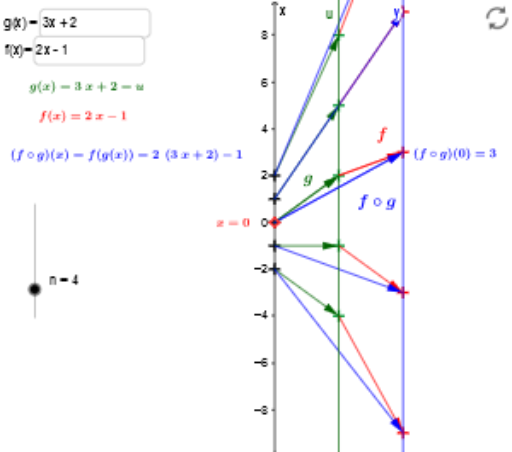
①This example illustrates the composition of two functions f and g, displaying the values of the composite function at discrete points via vector sequences and dynamic text. ②Core mathematical concepts include function composition, vector representation, sequences, and the interaction between function graphs and coordinate axes. ③Construction details: Uses GeoGebra commands Point, Vector, Textfield, Sequence, and Zip; objects include input boxes inputBox1 and inputBoxf for entering function expressions, buttons button1 and button2 to trigger calculations, sequences x_n, gx_n, fgx_n generating discrete points, vectors uaxis, w for direction, and text objects textforf, textforg, text4fg to display expressions and results. ④Target audience: high school or early college students learning the geometric meaning of function composition, and teachers for interactive classroom demonstrations of function iteration and vector decomposition.
GeoGebra Commands & Parameters
Point(yAxis) → AVector(A, B) → uVector(B, C) → vTextfield(g) → inputBox1Textfield(f) → inputBoxfVector(A, C) → wSequence(0, n) → NZip((0, y(A) - n / 2 + s), s, N) → x_nZip(Vector[A, B], A, x_n, B, gx_n) → xu_nZip(Vector[A, B], A, gx_n, B, fgx_n) → uy_nZip(Vector[A, B], A, x_n, B, fgx_n) → xy_n