
Quiz: Adding Integers - Interactive Practice with Random Vectors
Loading the math board and drawing, please wait…
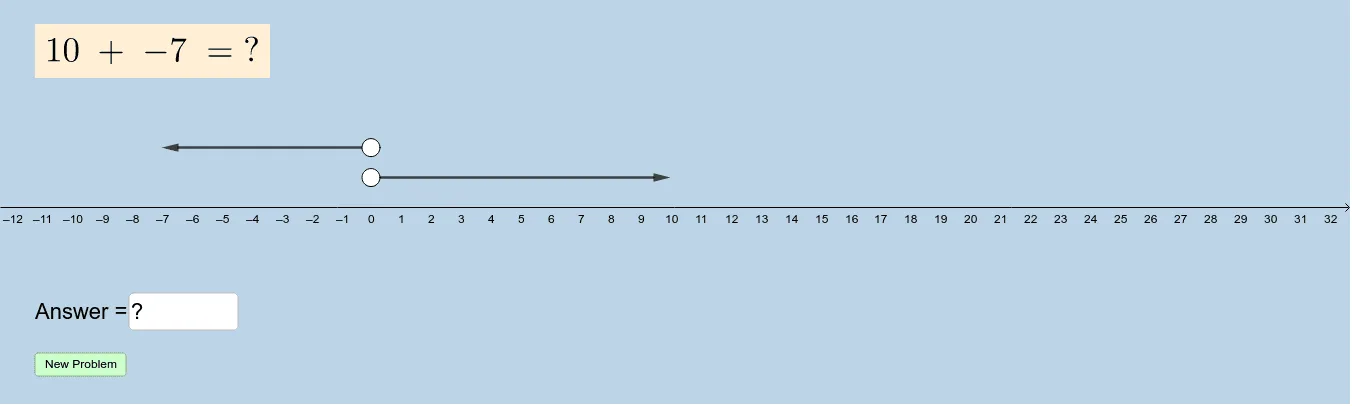
This GeoGebra example is an interactive quiz designed for practicing integer addition. It dynamically generates random integer addition problems and provides an input box for students to enter their answers. The core mathematical concept is integer arithmetic, including rules for adding positive and negative numbers. The construction uses commands such as Point, Random, Vector, and Textfield to create random points and vectors that visually represent the addition process. Objects like f, g, A, B, a, b, C, D, u, v, button1, button2, text1, text2, and InputBox1 are used to build the interface, with buttons for generating new problems and submitting answers. This resource is suitable for upper elementary to middle school students to reinforce integer operations, and can be used for classroom practice or self-assessment.
GeoGebra Commands & Parameters
Point(f) → APoint(g) → BRandom(-10, 10) → aRandom(-10, 10) → bVector(A, C) → uVector(B, D) → vTextfield(c) → InputBox1
AI Drawing Prompt Reference
Create an interactive integer addition practice interface. Place two random points on two separate lines, each labeled with a random integer between -10 and 10. From each point, draw a vector pointing to another random position, with length and direction representing the addends. Include an input box for entering the sum, and two buttons: one to generate a new problem and one to submit the answer. The layout should be clean and suitable for students practicing addition of positive and negative numbers.
The prompt above was compiled from the original drawing commands and is for reference only.