
Interactive Demonstration of Trigonometry and Piecewise Functions
Loading the math board and drawing, please wait…
In collections
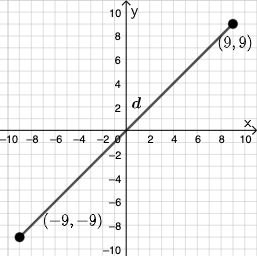
Open Middle: Distance in the Coordinate Plane (3)
This example demonstrates the combined application of trigonometric functions and piecewise functions through interactive graphics. It involves core math concepts like trigonometry, limits, piecewise functions, and coordinate geometry. GeoGebra commands and objects such as PointIn, Segment, SurdText, Textfield, Point, If, Mode, Intersect, Polygon, and Angle are used in its construction. Suitable for high school students and educators to understand the drawing and property analysis of complex function graphs.
GeoGebra Commands & Parameters
PointIn(e) → APointIn(e) → BSegment(A, B) → fSurdText(f) → text1Textfield(j) → InputBox1Textfield(k) → InputBox2Point(Circle[A, sqrt((100 * j) + (10 * k) + o)]) → CSegment(A, C) → lIf(m < i, "Too short!", m > i, "Too long!", "This value is correct!") → text7Mode(l1) → l2Intersect(eq1, p) → DPolygon(A, D, B) → t1, b_1, a_1, d_1Segment(A, D) → qSegment(D, B) → rAngle(B, D, A) → αTextfield(o) → InputBox3If(Length[l2] ≟ 0, "AV's of all digits are different.", "AV's of some digits repeat.") → text8
AI Drawing Prompt Reference
In one coordinate plane, create an interactive construction: start with two points and draw the segment between them, then add a label showing that segment’s length-related text. Provide three input fields to control parameters, and generate a third point as the intersection of a circle centered at the first point with a radius defined from those inputs. Connect this point to the corresponding endpoints to form the key segments, include a conditional message that switches between “Too short!”, “Too long!”, or “This value is correct!”, and form a polygon (triangle-like) using the original endpoints and the computed intersection point. Measure and display the angle defined by three of the points, and add another conditional text based on a length check so the annotations update with the parameters.
The prompt above was compiled from the original drawing commands and is for reference only.