
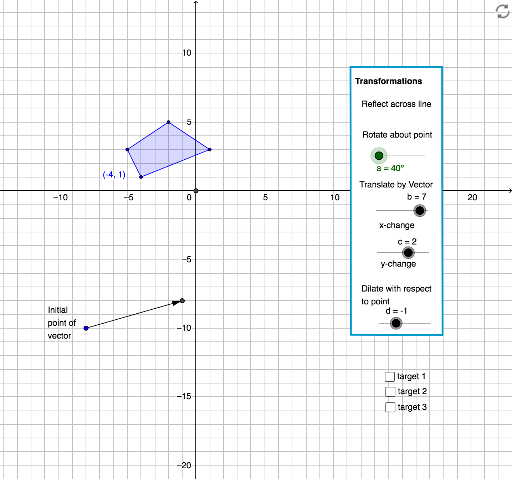
Interactive Demo of Multiple Transformations
Loading the math board and drawing, please wait…
In collections
Congruence (CO) Cluster
Congruence (Vol 1)
Congruence (Vol 1) Over 80 Resources
Geometry (Congruence) Volume 1
CCSS High School: Geometry (Congruence) Volume 1 S N ATTAR
CCSS High School: Geometry (Congruence) Volume 1
CCSS High School: Geometry (Congruence) Volume 1
CCSS High School: Geometry (Congruence) Volume 1
CCSS High School: Geometry (Congruence) Volume 1
CCSS High School: Geometry (Congruence) Volume 1
CCSS High School: Geometry (Congruence) Volume 1
CCSS High School: Geometry (Congruence) Volume 1
CCSS High School: Geometry (Congruence) Volume 1
CCSS High School: Geometry (Congruence) Volume 1
CCSS High School: Geometry (Congruence) Volume 1
CCSS High School: Geometry (Congruence) Volume 1
CCSS High School: Geometry (Congruence) Volume 1
Rotations
This example demonstrates dynamic operations on polygons through various geometric transformations (rotation, reflection, dilation). Key math concepts include geometric transformations, linear equations, vector operations, and analytical geometry. Construction highlights from the summary involve commands like Polygon, Segment, Intersect, Point, OrthogonalLine, Rotate, Mirror, Dilate, and Vector. Suitable for high school and above learners to understand the application and parametric effects of transformations in geometry.
GeoGebra Commands & Parameters
Polygon(A, B_1, 4) → poly1, f_2, g, h, i, E, FSegment(F, B_1) → lSegment(A, E) → mIntersect(l, m) → GPolygon(H, I, J, K) → poly2, h_1, i_1, j_1, k_1Point(poly2) → LPoint(poly2) → MPoint(poly2) → NOrthogonalLine(L, yAxis) → nOrthogonalLine(M, yAxis) → pOrthogonalLine(N, yAxis) → qOrthogonalLine(I, i_1) → rOrthogonalLine(I, i_1) → sOrthogonalLine(L, n) → tOrthogonalLine(K, t) → a_1OrthogonalLine(J, a_1) → b_1Segment(H, I) → c_1Intersect(n, b_1) → OSegment(O, L) → d_1Segment(H, K) → e_1Segment(K, J) → f_1Segment(J, I) → g_1Point(p) → PSegment(M, P) → l_1Intersect(q, b_1) → QSegment(N, Q) → m_1Intersect(xAxis, yAxis) → RPoint(Circle[A, 5]) → URotate(V, a, A) → V'Mirror(V', yAxis) → V''Point(Circle[A, 4.123105625617661]) → BDilate(B, d, C) → B'Dilate(D, d, C) → D'Dilate(S, d, C) → S'Dilate(T, d, C) → T'Rotate(B, a, C) → B'_1Rotate(D, a, C) → D'_1Rotate(S, a, C) → S'_1Rotate(T, a, C) → T'_1Rotate(B, a, C) → B'_2Rotate(D, a, C) → D'_2Rotate(S, a, C) → S'_2Rotate(T, a, C) → T'_2Rotate(W, a, C) → W'Rotate(Z, a, C) → Z'Rotate(A_1, a, C) → C_1Vector(R_1, C) → uPolygon(A, D_1, E_1, F_1) → poly3, a_2, d_3, e_2, f_3
AI Drawing Prompt Reference
Draw a dynamic geometric figure composed of multiple polygons, demonstrating transformations like rotation, reflection, and dilation. Start by creating a quadrilateral, then determine key points using segments and intersections. Generate auxiliary lines with perpendiculars and circles. Reflect the quadrilateral across the Y-axis, create multiple perpendicular lines, and perform rotations and dilations on various points to form transformed polygons, showcasing the effects of transformations.
The prompt above was compiled from the original drawing commands and is for reference only.