
Reflection across a line by Susan Sarkissian
Loading the math board and drawing, please wait…
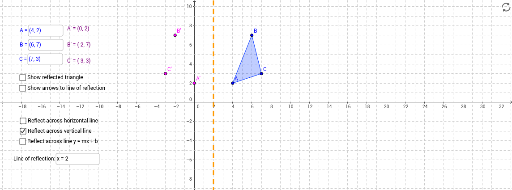
This example demonstrates the reflection transformation of points, line segments, and polygons across a line. It involves core math concepts like reflection symmetry, vector operations, and coordinate geometry. Construction uses commands Polygon, Textfield, Mirror, Midpoint, Vector with objects like fsi, boolsi, fstan, A, B, C, poly1_1, etc. Suitable for high school mathematics teaching on geometric transformations and coordinate geometry applications.
GeoGebra Commands & Parameters
Polygon(A, B, C) → poly1_1, c_1, a_1, b_1Textfield(B) → inputBoxBTextfield(A) → inputBoxATextfield(C) → inputBoxCMirror(B, If[boolsi ≟ true, fsi, fstan]) → B'Mirror(C, If[boolsi ≟ true, fsi, fstan]) → C'Mirror(A, If[boolsi ≟ true, fsi, fstan]) → A'Polygon(C', A', B') → poly1, b', c', a'Midpoint(B, B') → B_vMidpoint(C, C') → C_vMidpoint(A, A') → A_vVector(B, B_v) → v_1Vector(B', B_v) → v_2Vector(C, C_v) → w_1Vector(C', C_v) → w_2Vector(A, A_v) → u_1Vector(A', A_v) → u_2Textfield(fstan) → inputfstanTextfield(fsi) → inputfsi
AI Drawing Prompt Reference
Draw a line and place a triangle and a point on each side of it. Show the reflection of the triangle and point across the line, highlighting the midpoints of the original and reflected points and the vectors connecting these midpoints. Label the key points and vectors with text fields.
The prompt above was compiled from the original drawing commands and is for reference only.