
Interactive Demo: Line Segments & Probability Statistics
Loading the math board and drawing, please wait…
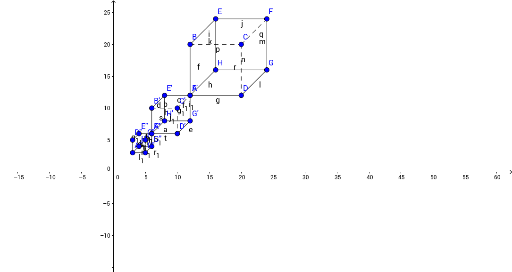
This example demonstrates line segments, random experiments, tangent lines, normal distribution, and conditional probability through interactive GeoGebra constructions. It involves core math concepts like segment creation, random experiment simulations, tangent and normal line calculations, normal distribution probability density functions, and conditional probability. The construction uses commands like Segment and objects such as B, C, D, E, F, G, H, A, f, g, h, i, j, k, l, m, n, p, q, r, A', B', C', D', E', F', G', H', s, t, a, b, c, d, e, f_1, g_1, h_1, i_1, j_1. It is suitable for high school and above students to explore the integration of probability statistics with analytical geometry and dynamic geometric transformations.
GeoGebra Commands & Parameters
Segment(A, B) → fSegment(A, D) → gSegment(A, H) → hSegment(B, E) → iSegment(E, F) → jSegment(E, H) → kSegment(D, G) → lSegment(F, G) → mSegment(G, H) → nSegment(B, C) → pSegment(C, F) → qSegment(C, D) → rSegment(A', B') → sSegment(A', D') → tSegment(A', H') → aSegment(B', E') → bSegment(E', F') → cSegment(E', H') → dSegment(D', G') → eSegment(F', G') → f_1Segment(G', H') → g_1Segment(B', C') → h_1Segment(C', F') → i_1Segment(C', D') → j_1Segment(A'', B'') → k_1Segment(A'', D'') → l_1Segment(A'', H'') → m_1Segment(B'', E'') → n_1Segment(E'', F'') → p_1Segment(E'', H'') → q_1Segment(D'', G'') → r_1Segment(F'', G'') → s_1Segment(G'', H'') → t_1Segment(B'', C'') → a_1Segment(C'', F'') → b_1Segment(C'', D'') → c_1
AI Drawing Prompt Reference
Draw a geometric pattern composed of multiple line segments, showing their relationships. Start with a base line and extend several line segments from points on this line in various directions, creating a complex structure. The segments connect to form an interconnected pattern, highlighting the diversity of line segment combinations.
The prompt above was compiled from the original drawing commands and is for reference only.