
GeoGebra Pudak Training 1.1: Basic Points and Construction
Loading the math board and drawing, please wait…
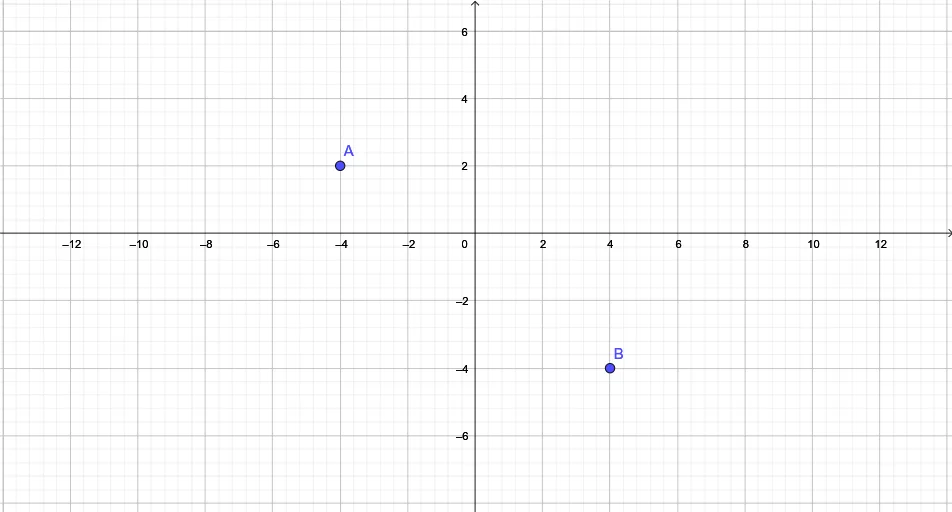
①This example is the first lesson of the GeoGebra Pudak training series, demonstrating how to create and display the most basic geometric objects—points A and B—as the starting point for geometric construction. ②Core mathematical concepts involve fundamental elements of geometric construction (points, segments), with potential extensions to advanced topics like limits, integrals, binomial distribution, and calculus, but this specific example focuses on defining and showing points. ③Construction highlights: from the summary, only two point objects A and B are used, with no complex commands or transformations, making it ideal for beginners to familiarize themselves with GeoGebra's interface and basic operations, such as using the point tool or entering coordinates in the input bar. ④Target audience: middle school and above mathematics beginners, or teachers training students in GeoGebra basics; also serves as an entry point for the Pudak series, preparing learners for subsequent topics like segments, functions, and calculus.
GeoGebra Commands & Parameters
Point A(-4, 2)Point B(4, -4)
AI Drawing Prompt Reference
Draw two basic points on a coordinate plane. First place one point at coordinates (-4, 2). Then place a second point at (4, -4). Make sure both points appear clearly on the same plane as the starting objects for further geometric construction.
The prompt above was compiled from the original drawing commands and is for reference only.