
Geometric Visualization of Eratosthenes Sieve with Ellipse and Sequences
Loading the math board and drawing, please wait…
In collections
geometriadinamica.es
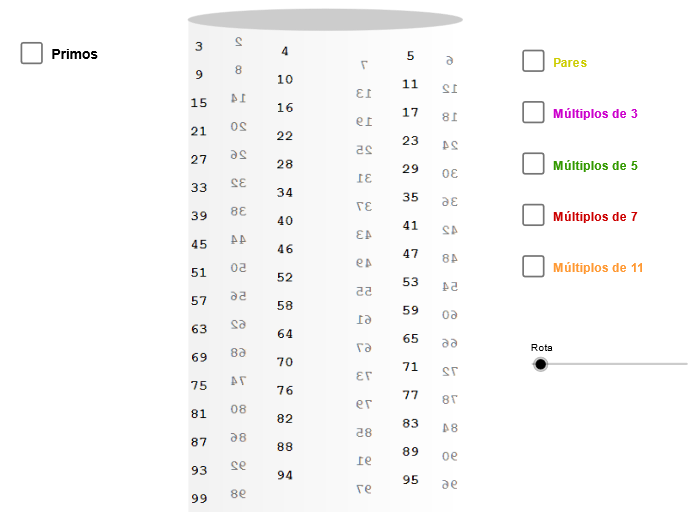
This example demonstrates how the Eratosthenes sieve idea can be visualized through dynamic geometry and sequence-driven constructions. It links the prime-sieving concept with coordinate geometry: key mathematical notions include prime filtering, sequence generation (Sequence), constructing points and curves in the Cartesian plane, and using geometric primitives to encode sieve steps. Construction workflow: an Ellipse is created as the geometric baseline; Point and Element are used to define and manage key points and derived objects; Sequence generates the indexing/parameter values used to mark and progressively filter candidates; CurveCartesian draws the relationships in the Cartesian coordinate system; Segment is used to connect or highlight structural parts of the construction. Additional parameter/angle controls (e.g., a rotation angle variable) and parameter objects (such as p, h0, L, m2, m3, m5, m7, m11, etc.) guide how positions update across iterations. The resulting labeled indicators (e.g., primo and multiple picXX objects) reveal where primes are selected. Suitable for advanced secondary students and undergraduates for GeoGebra-based learning of number theory concepts, algorithm-to-visualization projects, and coordinate/geometry modeling.
GeoGebra Commands & Parameters
Ellipse((-6.62, 5), (-5.38, 5), 0.65) → zElipse1Point(zElipse1) → XYCurveCartesian(((3 * cos(t)) * sin(zAngRot)) + ((3 * sin(t)) * cos(zAngRot)), (tan(p / 30) * t) + 5, t, (-34 * p), 0) → h0Sequence(h0(((-i) * p / 3)), i, 0, 98) → LSequence(Circle[h0(((-i) * p / 3)) + (0.19, 0.1), h0(((-i) * p / 3))], i, 0, 98) → L1Element(L1, 2) → p01Element(L1, 3) → p02Element(L1, 5) → p03Element(L1, 7) → p04Element(L1, 11) → p05Element(L1, 13) → p06Element(L1, 17) → p07Element(L1, 19) → p08Element(L1, 23) → p09Element(L1, 29) → p10Element(L1, 31) → p11Element(L1, 37) → p12Element(L1, 41) → p13Element(L1, 43) → p14Element(L1, 47) → p15Element(L1, 53) → p16Element(L1, 59) → p17Element(L1, 61) → p18Element(L1, 67) → p19Element(L1, 71) → p20Element(L1, 73) → p21Element(L1, 79) → p22Element(L1, 83) → p23Element(L1, 89) → p24Element(L1, 97) → p25Element(L1, 10) → m502Element(L1, 15) → m503Element(L1, 20) → m504Element(L1, 25) → m505Element(L1, 30) → m506Element(L1, 35) → m507Element(L1, 40) → m508Element(L1, 45) → m509Element(L1, 50) → m510Element(L1, 55) → m511Element(L1, 60) → m512Element(L1, 65) → m513Element(L1, 70) → m514Element(L1, 75) → m515Element(L1, 80) → m516Element(L1, 85) → m517Element(L1, 90) → m518Element(L1, 95) → m519Element(L1, 14) → m702Element(L1, 21) → m703Element(L1, 28) → m704Element(L1, 35) → m705Element(L1, 42) → m706Element(L1, 49) → m707Element(L1, 56) → m708Element(L1, 63) → m709Element(L1, 70) → m710Element(L1, 77) → m711Element(L1, 84) → m712Element(L1, 91) → m713Element(L1, 98) → m714Element(L1, 22) → m112Element(L1, 33) → m113Element(L1, 44) → m114Element(L1, 55) → m115Element(L1, 66) → m116Element(L1, 77) → m117Element(L1, 88) → m118Element(L1, 99) → m119Segment(h0(((-p)) / 3) + (0.2, -0.12), h0((-97 * p / 3)) + (0.2, -1)) → s2aSegment(h0((-p)) + (0.2, 0.1), h0((-93 * p / 3)) + (0.2, -1)) → s2bSegment(h0((-5 * p / 3)) + (0.15, 0.1), h0((-95 * p / 3)) + (0.15, -1)) → s2cSegment(h0((-2 * p / 3)) + (0.2, -0.12), h0((-98 * p / 3)) + (0.2, -1)) → s3aSegment(h0((-5 * p / 3)) + (0.2, 0.1), h0((-95 * p / 3)) + (0.2, -1)) → s3bCurveCartesian(0.2 + ((3 * cos(t + p)) * sin(zAngRot)) + ((3 * sin(t)) * cos(zAngRot)), (tan(27.7°) * t) + 10.7, t, (-11 * p), (-11 * p / 3) - 0.1) → h5CurveCartesian(0.2 + ((3 * cos(t)) * sin(zAngRot)) + ((3 * sin(t)) * cos(zAngRot)), (tan(36.4°) * t) + 13.7, t, (-17 * p / 2), (-4 * p) - 0.1) → h7CurveCartesian(0.2 + ((3 * cos(t + p)) * sin(zAngRot)) + ((3 * sin(t)) * cos(zAngRot)), (tan(49°) * t) + 17.2, t, (-33 * p / 5), (-11 * p / 3) - 0.1) → h11Ellipse((-3, 5.5), (3.4, 5.5), 3.21) → base
AI Drawing Prompt Reference
Visualize the Eratosthenes sieve by drawing an ellipse in the Cartesian coordinate system. Generate a sequence of circles centered on the ellipse, with positions determined by a rotation angle and sequence parameters. Highlight specific circles from the sequence (e.g., at indices 2, 3, 5, 7, 11, 13, 17, 19, 23, 29, 31, 37, 41, 43, 47, 53, 59, 61, 67, 71, 73, 79, 83, 89, 97) using distinct colors or styles, and connect these highlighted circles with lines to illustrate the prime filtering process, emphasizing primes with a special marker.
The prompt above was compiled from the original drawing commands and is for reference only.