
Interactive Construction of Functions and Their Inverses
Loading the math board and drawing, please wait…
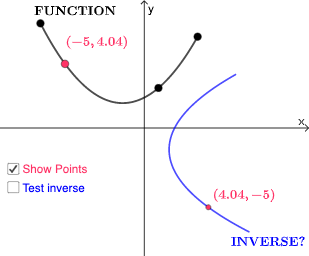
This GeoGebra example demonstrates how to construct a function and its inverse graphically. Given an original function f(x), the inverse function f⁻¹(x) is represented using the CurveCartesian command to draw parametric curves, while Point and Intersect commands locate intersection points between the two function graphs. Key mathematical concepts include the relationship between functions and inverses, symmetry of function graphs (symmetry about y=x), and definite integral concepts. Construction highlights: ①Using Min/Max commands to determine function domain; ②Using FitPoly for polynomial fitting; ③Using CurveCartesian for inverse function parametric curves; ④Using Intersect for intersections and related geometric objects. Suitable for high school mathematics teaching of functions and inverses, as well as college calculus courses demonstrating function transformations.
GeoGebra Commands & Parameters
Min({x(A), x(B), x(C)}) → aMax({x(A), x(B), x(C)}) → bFitPoly({A, B, C}) → fCurveCartesian(g(t), t, t, a, b) → cPoint(g) → DPoint(c) → FIntersect(eq1, c) → G, H, G_{1}
AI Drawing Prompt Reference
Draw a function and its inverse, showing the symmetry about the line y=x. First, determine the domain of the function using min and max values to find the range, then fit a polynomial to get the original function. Next, plot the inverse function using parametric equations. Mark the intersection points between the original and inverse functions, and highlight the symmetry and integral concepts by calculating and displaying the intersection points.
The prompt above was compiled from the original drawing commands and is for reference only.