
Interactive Complex Numbers & Calculus Example
Loading the math board and drawing, please wait…
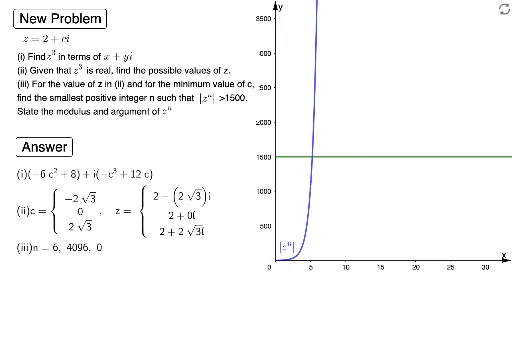
This example demonstrates the dynamic relationship between complex numbers and calculus through interactive visualization, focusing on function graphs and complex operations. It involves core concepts like complex numbers, calculus, isosceles triangles, and median value theorem. GeoGebra commands such as Random, RandomElement, Sequence, If, Min, Length, Solutions, Element, TableText, SurdText are utilized in construction. Suitable for high school and above learners to understand the application of complex operations and calculus in geometric problems.
GeoGebra Commands & Parameters
Random(1, 2) → a1RandomElement({3, 4}) → bRandom(1, 3) → a2Sequence(x(Element[l2, i]), i, 1, Length[l2]) → l4Sequence(x(Element[l1, i]), i, 1, Length[l1]) → l3If(d ≟ 1, l3, l4) → l5Min(l5) → c1Sequence(SurdText[x(Element[l1, i]), {sqrt(2), sqrt(3), sqrt(5)}], i, 1, Length[l1]) → l6Sequence(SurdText[x(Element[l2, i]), {sqrt(2), sqrt(3), sqrt(5)}], i, 1, Length[l2]) → l7If(d ≟ 1, l6, l7) → l8Length(l8) → eSolutions(h = h1) → l10Solutions(h(x) > l) → l9Element(l9, 1) → iIf(d ≟ 1, "real", "imaginary") → text4Length(l5) → aIf(a ≟ 4, Element[l5, 2], 0) → c2Sequence(a1 + ((a2 * Element[l5, i]) * ί), i, 1, a) → l11Sequence(SurdText[Element[l11, i]], i, 1, a) → l12TableText(l8, "c") → text7TableText(l12, "c") → text2Sequence(Sequence[Element[l8, j], i, 1, 1], j, 1, e) → l13TableText(l13, "c{") → text8Sequence(Sequence[Element[l12, j], i, 1, 1], j, 1, e) → l14TableText(l14, "c{") → text9SurdText(arg(z1^(j)), {π}) → αSurdText(k, {sqrt(2), sqrt(3)}) → text11RandomElement({3, 4}) → b_1