
Complex integration: z^(1/2)
Loading the math board and drawing, please wait…
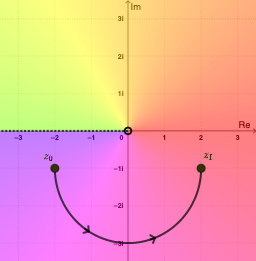
This example demonstrates the graphical representation of the complex integral z^(1/2), highlighting the geometric significance of complex numbers in integration. Key mathematical concepts include complex number operations, integration transformations, and geometric construction. The construction involves GeoGebra commands such as SelectedIndex, Midpoint, Distance, Element, Segment, Derivative, etc., to create complex paths and integration regions. Suitable for high school students or college undergraduates learning complex analysis and calculus fundamentals.
GeoGebra Commands & Parameters
SelectedIndex(pathNames) → pathIndexMidpoint(A, B) → MDistance(A, B) → distABElement(pathList, pathIndex) → pathSegment(path(0.3), path(0.3 + 0.01)) → arrow1Segment(path(0.6), path(0.6 + 0.01)) → arrow2Element(X, pathIndex) → ReztElement(Y, pathIndex) → ImztDerivative(Rezt, t) → dReztDerivative(Imzt, t) → dImztSelectedIndex(plotNames) → plotIndexRay((0, 0), (-1, 0)) → brachCutSelectedIndex(branchNames) → branchIndex
AI Drawing Prompt Reference
Draw a complex plane diagram illustrating the integral of z^(1/2). Start with a smooth curve path from a start point to an end point, and mark several sample points along it. At each sample point, draw a short arrow tangent to the path to represent the differential element. Additionally, plot the real and imaginary parts of the path as separate curves, showing their derivatives. Include a branch cut as a ray from the origin along the negative real axis to distinguish branches. The final image should clearly show the path, tangent arrows, real/imaginary component curves, and the branch cut, emphasizing the geometric interpretation of complex integration.
The prompt above was compiled from the original drawing commands and is for reference only.