
Interactive Area of Rectangle Practice: MT1-06-P2a-XT1
Loading the math board and drawing, please wait…
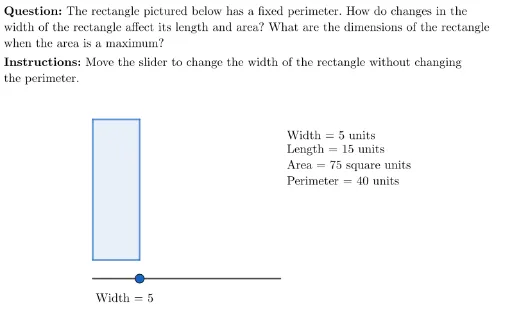
This GeoGebra example demonstrates an interactive exercise for calculating the area of a rectangle, featuring dynamic feedback and self-assessment. The core mathematical concept is the rectangle area formula (length × width), along with perimeter and the relationship between dimensions. The construction uses commands such as Segment, Point, Polygon, Length, Line, Intersect, and Slider to build the rectangle and allow width adjustment. Conditional logic via If, along with LaTeX and UnicodeToLetter, enables dynamic display of values and feedback elements like correct/incorrect markers and buttons. Suitable for upper elementary or middle school students to reinforce area concepts, and useful for classroom demonstrations or independent practice.
GeoGebra Commands & Parameters
Segment(E, E + (20, 0)) → mySliderPoint(mySlider) → SUnicodeToLetter(10007) → xmarkUnicodeToLetter(10003) → cmarkLaTeX("\text{\textbf{Instructions: }Move the slider to change the width of the rectangle without changing \\the perimeter.}") → SpecInstrucLength(Segment[E, S]) → widthLine(A, yAxis) → l_1Line(B, yAxis) → l_2Intersect(l_2, Line[C, xAxis]) → DPolygon(C, A, B, D) → q1, c, a_1, b, dLength(Segment[A, C]) → lengthPerimeter(q1) → perimLength(Segment[E, S]) → testIf(width ≟ 0, "width", If[length ≟ 0, "length", ""]) → zeroDimensionLaTeX((("\text{Recognize that when the " * zeroDimension) * " is zero units, no rectangle exists.}")) → msgNoRectangleLaTeX("\text{\textbf{Question: }The rectangle pictured below has a fixed perimeter. How do changes in the \\width of the rectangle affect its length and area? What are the dimensions of the rectangle \\when the area is a maximum?}") → MainInstrucLaTeX(((MainInstruc * "\\") * SpecInstruc)) → CompleteInstruc
AI Drawing Prompt Reference
Draw a rectangle shape where one side is controlled by a slider that adjusts the width. The perimeter of the rectangle remains fixed, and as the width changes, the length and area also change. The graphic includes feedback markers and a question text prompting users to think about how changes in width affect length and area under a fixed perimeter, and to determine the dimensions when area is maximized. The construction order is to draw the rectangle first, add the slider, adjust the width, and dynamically display feedback.
The prompt above was compiled from the original drawing commands and is for reference only.