
Integers for Height: Compare Elevations with Moving Dolphins
Loading the math board and drawing, please wait…
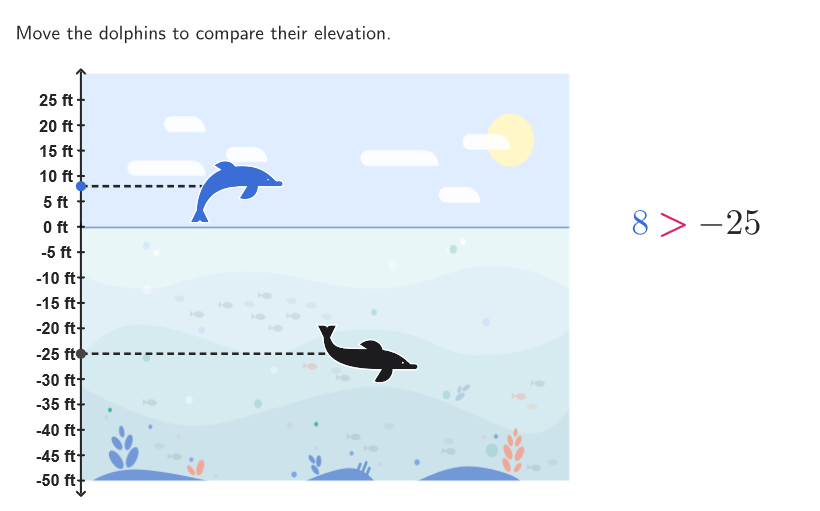
This GeoGebra example uses an animation of dolphins moving to different elevations to help learners compare and interpret integer heights. The key idea is that positive integers represent positions above a chosen baseline, while negative integers represent positions below it, enabling students to reason about which elevation is higher/lower and to write comparison statements. It targets concepts such as integer meaning by sign, ordering/comparing integers on a number line or height baseline, and using models/visual representations to support number-sense and reasoning. Construction highlights include using Polygon and Segment to build the baseline/scene geometry, PointIn and Corner to create and place key points, Sequence and Zip to generate and bundle multiple related objects, and interactive objects (e.g., dolphins and label/value text) such as labelsGrid, labelValues/labelsInPLace, textQuestion, and textCompare to display input values and guide open-ended comparisons. Best suited for Grades 6–8 classroom use and guided exploration of comparing and ordering integers with or without visual models.
GeoGebra Commands & Parameters
Polygon(CO1 + (2, 7), CO2 + (-1.7, 7), CO3 + (-1.7, -7), CO4 + (2, -7)) → dolphPeepB, j, k, l, mPointIn(dolphPeepB) → BLUE1Polygon(CO1 + (2, 7), CO2 + (-1.7, 7), CO3 + (-1.7, -7), CO4 + (2, -7)) → dolphPeepG, f, g, h, iPointIn(dolphPeepG) → GRAY1Corner(blueGuy, 3) → BLUE3Sequence((x(CO1), t), t, y(CO1), 25, 5) → labelsGridSequence((t * " ft"), t, -50, 25, 5) → labelValuesZip(Text[("" * A), B, false, false, 0, 0], A, labelValues, B, labelsGrid + (-0.8, 0)) → labelsInPLaceSequence(Segment[(x(CO1) - 0.1, t), (x(CO1) + 0.1, t)], t, y(CO1), 25, 5) → vertTicksSegment((x(BV), y(BV) - 3), (x(HV), y(HV) + 6)) → vertLineSegment(GRAYR, GRAY1) → hor1Segment(BLUER, BLUE1 + vCenterOffset) → hor2
AI Drawing Prompt Reference
Draw a baseline with two horizontal line segments, above and below which are several dolphin shapes connected by line segments. Label integer values from -50 to 25 below the baseline, connecting each value to the line with a vertical segment. A blue dolphin and a gray dolphin move along the baseline, leaving traces as they move, with the blue dolphin below and the gray dolphin above the baseline.
The prompt above was compiled from the original drawing commands and is for reference only.