
Integer Subtraction on Number Line
Loading the math board and drawing, please wait…
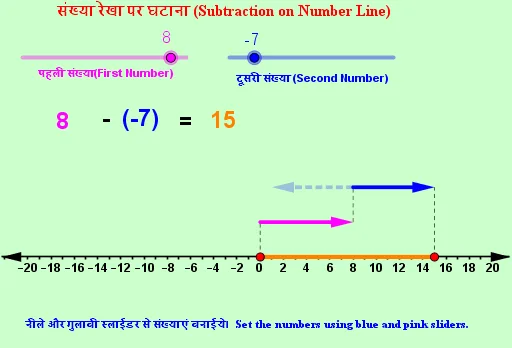
This example visually demonstrates the process of integer subtraction using a number line. It involves core math concepts like integers, number line representation, subtraction operations, and geometric interpretation. Constructed with GeoGebra commands such as Text, Vector, and Segment, it is suitable for middle school mathematics education to help students grasp the geometric representation of abstract subtraction operations.
GeoGebra Commands & Parameters
Text(a) → T1Text("-") → T2Text(If[b ≥ 0, b]) → T4Text(If[b < 0, "(" + ((b * ")"))]) → T3Text("=") → T5Text(result) → T6Vector(A, B) → uVector(C, D) → vSegment(O, Q) → fSegment(O, A) → gSegment(B, C) → hSegment(Q, D) → iVector(C, E) → w
AI Drawing Prompt Reference
Draw a horizontal number line with the origin at the center and positive direction to the right. Mark integer ticks along the line using segments from the origin. Above the line, display a subtraction expression as text: an integer, a minus sign, another integer (in parentheses if negative), an equals sign, and the result. Use three arrow vectors to show the subtraction steps: the first from the first integer position to the second, the second from the second to the result, and the third from the result to an extra point. Connect key points on the line with colored segments to highlight each step's start and end. Keep the layout clear for educational use.
The prompt above was compiled from the original drawing commands and is for reference only.