
Locating the Center of a Given Circle
Loading the math board and drawing, please wait…
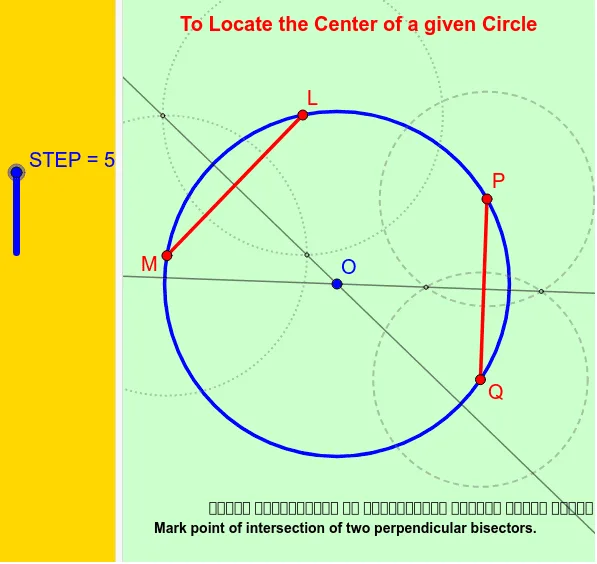
This example demonstrates how to precisely locate the center of a given circle using only points on the circle and basic geometric tools, by constructing perpendicular bisectors of chords. The core mathematical concepts are the symmetry of a circle, the fact that the perpendicular bisector of any chord passes through the center, and that the intersection of two such bisectors gives the center. Construction steps include: using the Circle command to draw the given circle, Point to place points on the circle, Segment to connect two points forming a chord, LineBisector to construct the perpendicular bisector of the chord, and Intersect to find the intersection of two bisectors, with Line used for auxiliary lines. This example is suitable for middle school geometry lessons, helping students understand fundamental circle properties and compass-and-straightedge constructions, and can also be used for dynamic demonstrations verifying the uniqueness of the center.
GeoGebra Commands & Parameters
Circle(B, P) → dPoint(d) → QPoint(d) → LPoint(d) → MSegment(L, M) → fSegment(P, Q) → gLineBisector(f) → hPoint(f) → ACircle(L, A) → cCircle(M, Segment[L, A]) → eIntersect(c, e) → C, D, ,Line(D, C) → jPoint(g) → ECircle(P, E) → kCircle(Q, Segment[P, E]) → pIntersect(k, p) → F, G, ,Line(F, G) → iIntersect(i, j) → O
AI Drawing Prompt Reference
Draw a given circle. Place three points on the circle. Connect two of them to form a chord, and connect the other two to form another chord. Construct the perpendicular bisector of each chord. The intersection of these two bisectors is the center of the circle. Keep auxiliary lines and circles visible to show the construction steps.
The prompt above was compiled from the original drawing commands and is for reference only.