
Angle Subtended by a Chord at the Center
Loading the math board and drawing, please wait…
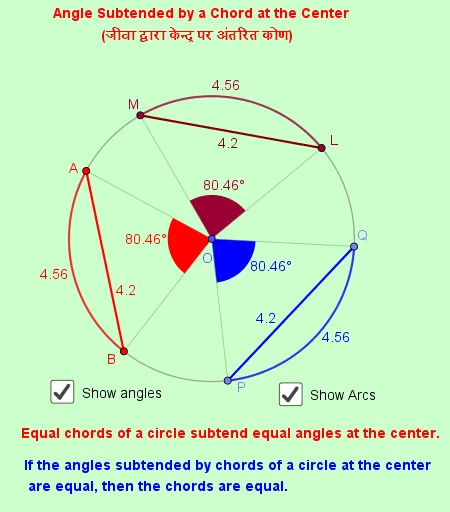
This example demonstrates the relationship between a central angle and a chord in a circle, visually showing how the central angle changes as the chord is manipulated. Key math concepts include circles, chords, central angles, triangles, and rotational symmetry. It is constructed using GeoGebra commands like Circle, Point, Segment, Angle, Rotate, and CircleArc. Suitable for high school mathematics education to help students intuitively understand the central angle theorem and its applications.
GeoGebra Commands & Parameters
Circle(O, B) → cPoint(c) → ASegment(A, B) → fPoint(c) → PSegment(O, P) → iSegment(A, O) → jSegment(O, B) → kAngle(A, O, B) → βRotate(P, β, O) → QAngle(P, O, Q) → αSegment(O, Q) → gSegment(Q, P) → hPoint(c) → LRotate(L, β, O) → MAngle(L, O, M) → γSegment(M, L) → lSegment(L, O) → mSegment(O, M) → nCircleArc(O, A, B) → dCircleArc(O, P, Q) → eCircleArc(O, L, M) → p
AI Drawing Prompt Reference
Draw a circle with center O and points B, A on the circle. Connect B and A to form a chord. Draw line segments from O to A and B, and from O to another point P on the circle. Rotate OP by angle β to get point Q, and connect P and Q. Similarly, rotate OL by angle β to get point M, and connect L and M. Highlight the arcs of the chords AB, PQ, and LM, and display all angles and segments to illustrate the relationship between central angles and chords, as well as rotational symmetry.
The prompt above was compiled from the original drawing commands and is for reference only.