
Integer Multiplication Sign Rules Demonstration
Loading the math board and drawing, please wait…
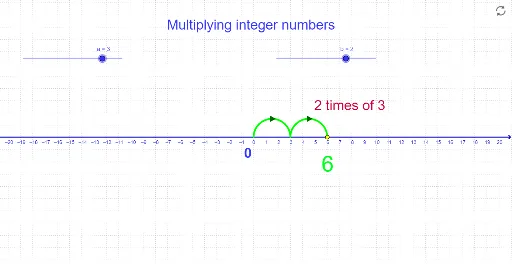
This example demonstrates the sign rules in integer multiplication. It involves core math concepts such as integer multiplication sign rules. Construction highlights include GeoGebra commands/objects like Arc, If, Sequence, and objects A, a, b, c, lista3, lista1, B, d, texto1, texto2, texto3, texto4, listarrowsRight, e, f, listarrowsleft, listarrowsfordoublenegativeonly. Suitable for middle school mathematics teaching to help students visually understand the sign rules.
GeoGebra Commands & Parameters
Arc((x - a / 2)^(2) = a / 2, (0, 0), (a, 0)) → cIf(b < 0, Sequence[(((-a) * n), 0), n, 0, (-b)], Sequence[((a * n), 0), n, 0, b]) → lista3Sequence(Semicircle[Element[lista3, n], Element[lista3, n + 1]], n, 1, abs(b)) → lista1Sequence((t, a / 2), t, a / 2, (a * b), a) → listarrowsRightIf(a > 0 ∧ b > 0 ∨ a < 0 ∧ b < 0, abs(a) / 2, ((-abs(a))) / 2) → fSequence((t, If[a > 0 ∧ b > 0 ∨ a < 0 ∧ b < 0, abs(a) / 2, ((-abs(a))) / 2]), t, ((a * b)) / abs(b) / 2, (a * b), If[(a * b) > 0, abs(a), (-abs(a))]) → listarrowsleftSequence((t, abs(a) / 2), t, abs(a) / 2, abs((a * b)), abs(a)) → listarrowsfordoublenegativeonly
AI Drawing Prompt Reference
Create a diagram illustrating the sign rules for integer multiplication. Start by drawing a semicircle, then use sequence commands to draw arrows pointing right and left based on the values of integers a and b. Pay attention to the starting and ending points of the arrows, and how their lengths change according to the product of a and b.
The prompt above was compiled from the original drawing commands and is for reference only.