
Inscribed Circle in Triangle With Tangents: Area & Perimeter
Loading the math board and drawing, please wait…
In collections
Circles
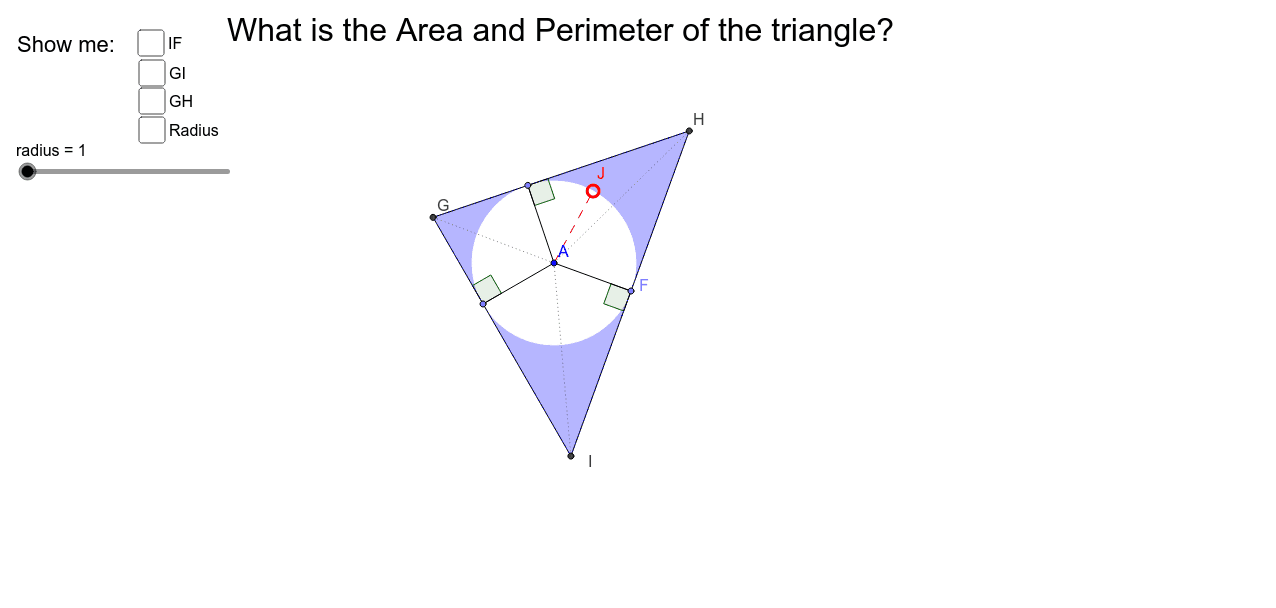
This example demonstrates the construction of a circle inscribed in a triangle and the tangents from the vertices to the circle. It involves core mathematical concepts such as the incircle, tangent lengths, triangle area, and perimeter. GeoGebra commands and objects used include Circle, OrthogonalLine, Intersect, Rotate, CircleArc, Point, Segment, Angle, Polygon, Distance, and Midpoint. Suitable for high school students to understand geometric constructions and calculations of triangle properties.
GeoGebra Commands & Parameters
Circle(A, 4) → cOrthogonalLine(A, a) → bIntersect(c, b, 2) → BRotate(B, 45*°, A) → B'Rotate(B', 75*°, A) → B''Rotate(B, -80*°, A) → B'_1Rotate(B'_1, -30*°, A) → CCircleArc(A, B, B') → dCircleArc(A, C, B'_1) → eRotate(B'', 45*°, A) → B'''CircleArc(A, B'', B''') → fPoint(d) → DPoint(f) → EPoint(e) → FSegment(A, D) → gSegment(A, E) → hSegment(A, F) → iOrthogonalLine(D, g) → jOrthogonalLine(E, h) → kOrthogonalLine(F, i) → lIntersect(j, k) → GIntersect(j, l) → HIntersect(k, l) → ISegment(D, H) → mSegment(H, F) → nSegment(F, I) → pSegment(I, E) → qSegment(E, G) → rSegment(G, D) → sSegment(A, I) → tSegment(A, H) → a_1Segment(A, G) → b_1Angle(A, D, H) → αAngle(A, F, I) → βAngle(A, E, G) → γPolygon(G, H, I) → poly1, i_1, g_1, h_1Point(c) → JSegment(A, J) → c_1Distance(G, H) → distanceGHDistance(G, I) → distanceGIDistance(I, F) → distanceIFDistance(A, J) → distanceAJMidpoint(A, J) →
AI Drawing Prompt Reference
Draw a triangle and inscribe a circle inside it. Draw tangent lines from each vertex of the triangle to the incircle. Show the points where the tangents intersect the circle and connect these points to form a hexagon. Measure and label the side lengths of the triangle, its perimeter, and the radius of the incircle. Calculate and display the area of the triangle.
The prompt above was compiled from the original drawing commands and is for reference only.