
Inscribed Angle Theorem: Corollary 1 – Angle in a Semicircle
Loading the math board and drawing, please wait…
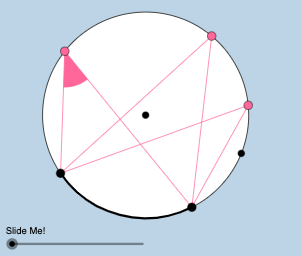
This GeoGebra example dynamically demonstrates Corollary 1 of the Inscribed Angle Theorem: when an inscribed angle subtends a semicircle (i.e., its chord is a diameter), the angle is always a right angle (90°). The core mathematical concepts include the inscribed angle theorem, arcs, chords, central angles, and the relationship between an angle and its intercepted arc. The construction uses commands such as Circle to define the circle, Point to place points on the circle, CircleArc to create arcs, Segment to draw chords, Angle to measure the inscribed angle, Rotate and Translate to move points dynamically, Intersect to find intersection points, Dilate for scaling, Vector and Line for auxiliary constructions, and CircleSector for sectors. Multiple objects (A, B, C, D, E, F, etc.) and angle variables (α, β, γ, δ) are used. This is ideal for middle or high school geometry classes to visually verify the theorem and explore why an angle in a semicircle is always right, supporting inquiry-based learning.
GeoGebra Commands & Parameters
Circle(A, B) → cPoint(c) → CPoint(c) → DCircleArc(A, D, C) → dPoint(d) → EPoint(d) → FCircleArc(A, C, D) → eSegment(A, C) → aSegment(A, D) → bSegment(E, C) → fSegment(E, D) → gSegment(F, C) → hSegment(F, D) → iAngle(C, A, D) → αRotate(C, α / 2, A) → C'Angle(C, A, C') → βSegment(A, C') → jCircle(E, (0.35 * Distance[A, B])) → kIntersect(k, f, 1) → GIntersect(k, g, 1) → HCircle(F, (0.35 * Distance[A, B])) → pIntersect(p, h, 1) → JIntersect(p, i, 1) → KCircleSector(E, G, H) → qCircleSector(F, J, K) → rDilate(E, If[0 < l ≤ 1, 1 - l, 0], A) → E'Vector(E, E') → uLine(E, a) → mIntersect(k, m, 2) → LAngle(L, E, G) → γDilate(E, If[2 < l ≤ 3, 3 - l, 0], A) → E'_1Vector(E, E'_1) → vLine(E, j) → nIntersect(k, n, 2) → MAngle(M, E, G) → δCircle(A, (0.35 * Distance[A, B])) → tIntersect(t, a, 1) → NIntersect(t, j, 1) → OIntersect(t, c, 1) → IIntersect(t, b) → P,CircleArc(A, N, P) → c_1Point(d) → QSegment(Q, C) → a_1Segment(Q, D) → b_1Dilate(E, If[0 < l ≤ 1, 1 - l, 0], F) → E'_2Dilate(E, If[0 < l ≤ 1, 1 - l, 0], Q) → E'_3Vector(E, E'_2) → wVector(E, E'_3) → sTranslate(q, s) → q'_1Line(E, i) → d_1Intersect(k, d_1) → R, SAngle(H, E, S) → εLine(E, a_1) → e_1Intersect(k, e_1) → T, UAngle(U, E, G) → ζCircleArc(A, D, C) → g_1Rotate(q'_1, If[0 < l ≤ 1, ((-l) * ζ), (-ζ)], E'_3) → f_1Dilate(Q, If[2 < l ≤ 3, 3 - l, 0], F) → Q'Vector(Q, Q') → u_1Translate(f_1, u_1) → h_1Line(Q, h) → i_1Point(i_1) → VAngle(V, Q, C) → θRotate(h_1, If[2 < l ≤ 3, ((-(l - 2)) * θ), (-θ)], Q') → k_1
AI Drawing Prompt Reference
Draw a circle with a diameter, place two points on the diameter, and connect them with a chord to another point on the circle, demonstrating the central and inscribed angles. Adjust the points dynamically to observe the relationship between the angles, using arcs and segments for assistance, and include sliders and transformation features.
The prompt above was compiled from the original drawing commands and is for reference only.