
Incircle-Related Construction and Angle-Driven Configuration (Ex. 10.3)
Loading the math board and drawing, please wait…
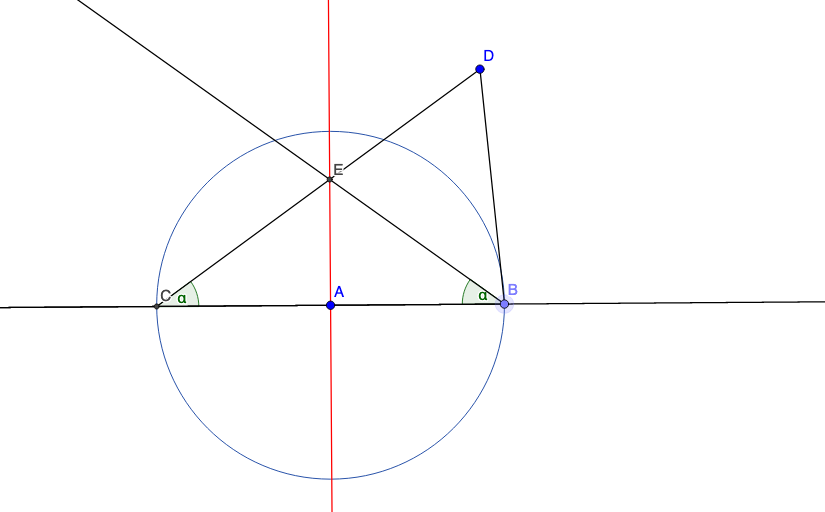
This example demonstrates how an incircle/inscribed-circle configuration and its key points can be constructed and explored through interactive angle control. It centers on circle geometry (intersections, defining constrained regions) and angle concepts, including measuring or constructing angles (e.g., α, β) and dynamically moving an angle to observe how the configuration updates. The construction is built with core GeoGebra commands: Line and Point to create and label the geometric entities (such as A, B, C, D and others), Circle to generate the relevant circles (objects like f, c, g, h), Intersect to compute intersection points that determine the configuration (e.g., i, i_2, E, F), Segment to establish key constrained segments, Angle to define/track the angles involved, and AngleMoverCW to rotate the angle clockwise for dynamic investigation. Suitable for middle to early high school geometry practice, especially learners working on geometric construction, circle/angle relationships, and dynamic geometry exploration.
GeoGebra Commands & Parameters
Line(A, B_1) → fPoint(f) → BCircle(A, Segment[A, B]) → cIntersect(c, f, 1) → CSegment(D, B) → gSegment(D, C) → hAngle(A, C, D) → αAngleMoverCW(A, C, D, B, A) → i, i_2Point(i) → FAngle(F, B, A) → βIntersect(h, i) → ELine(E, A) → j
AI Drawing Prompt Reference
Draw a triangle ABC with points A, B, and C on line f. Construct circle c with center A and radius AB, and find intersection point C with line f. Connect point D to points B and C to form segments g and h. Measure angle α between points A, C, and D. Use the angle rotation tool to rotate angle α around point A and generate point F. Measure angle β between points F, B, and A. Find the intersection point E of segment h and the rotation path of angle α. Finally, draw a line j through points E and A.
The prompt above was compiled from the original drawing commands and is for reference only.