
Incircle Construction Exercise (VB)
Loading the math board and drawing, please wait…
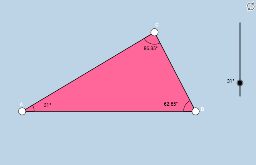
This example demonstrates how to construct the incircle of a triangle through geometric construction, incorporating vectors and rotations for an interactive exercise. The core mathematical concepts include the incircle (inscribed circle), the incenter, angle bisectors, points of tangency, vector rotation, and special points. The construction uses GeoGebra commands such as Point, Rotate, Angle, Segment, Ray, and Polygon, with objects like α, A, B, B', β, f, g, C, h, poly1, c, a, b, i, γ, and δ to dynamically adjust the figure. This exercise is suitable for middle and high school geometry classes, helping students understand the properties of the incircle and incenter while practicing geometric construction skills and dynamic geometry software usage.
GeoGebra Commands & Parameters
Point(xAxis) → ARotate(B, α, A) → B'Angle(B, A, B') → βSegment(A, B) → fRay(A, B') → gPoint(g) → CSegment(C, B) → hPolygon(A, B, C) → poly1, c, a, bSegment(A, C) → iAngle(A, C, B) → γAngle(C, B, A) → δ