
Phase A: Triangle Construction
Loading the math board and drawing, please wait…
In collections
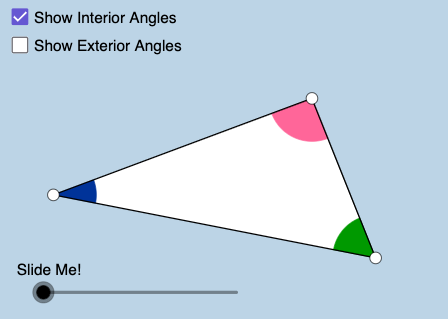
Polygon Angles: Interactive Exploration
This example demonstrates how to construct triangles using GeoGebra and explore their geometric properties. Key mathematical concepts include angles, polygons, circles, and vectors. Construction involves commands like Segment, Circle, Angle, and Midpoint, along with operations such as Rotate and Translate. Suitable for middle school or high school students to learn geometric construction and understand basic properties of triangles.
GeoGebra Commands & Parameters
Segment(B, C) → eSegment(C, A) → fMin(f, e) → mSegment(A, B) → dMin(d, f) → oMin(m, o) → uPolygon(A, B, C) → poly1, c, a, bRay(A, B) → hRay(B, C) → iRay(C, A) → jCircle(C, (0.25 * u)) → pCircle(A, (0.25 * u)) → qCircle(B, (0.25 * u)) → rIntersect(p, f) → D,Intersect(p, e, 1) → EIntersect(r, e, 1) → FIntersect(r, d, 1) → GIntersect(q, d, 1) → HIntersect(q, f, 1) → IIntersect(r, h, 2) → JIntersect(q, j, 2) → KIntersect(p, i, 2) → LMidpoint(f) → MMidpoint(e) → NCircleSector(A, H, I) → sCircleSector(B, F, G) → tCircleSector(C, D, E) → c_1Angle(A, C, B) → αCircleSector(C, E, D) → d_1CircleSector(A, I, H) → e_1CircleSector(B, G, F) → f_1Min(d, e) → nRotate(s, If[0 < l ≤ 1, ((-l) * 180°), -180°], M) → s'Rotate(A, If[0 < l ≤ 1, ((-l) * 180°), -180°], M) → A'Segment(M, A') → a_1Rotate(H, -180°, M) → H'Line(H', C) → b_1Rotate(B, If[0 < l ≤ 1, (l * 180°), 180°], N) → B'Rotate(t, If[0 < l ≤ 1, (l * 180°), 180°], N) → t'Segment(N, B') → g_1Segment(C, M) → h_1Segment(M, A) → i_1Segment(C, N) → j_1Segment(N, B) → k_1Rotate(A, If[0 < l ≤ 1, (l * 180°), -180°], M) → A'_1Rotate(B, If[0 < l ≤ 1, ((-l) * 180°), -180°], N) → B'_1Segment(N, B'_1) → l_1Segment(M, A'_1) → m_1Rotate(e_1, If[0 < l ≤ 1, (l * 180°), -180°], M) → p_1Rotate(f_1, If[0 < l ≤ 1, ((-l) * 180°), -180°], N) → q_1CircleSector(C, L, D) → r_1CircleSector(A, K, H) → s_1CircleSector(B, J, F) → t_1CircleSector(A, H, K) → c_2CircleSector(B, F, J) → d_2CircleSector(C, D, L) → e_2Dilate(A, 1 - v, C) → A'_2Dilate(B, 1 - v, C) → B'_2Vector(A, A'_2) → wVector(B, B'_2) → u_1Translate(s_1, w) → f_2CircleArc(A, K, H) → g_2Translate(t_1, u_1) → h_2CircleArc(B, J, F) → k_2Translate(c_2, w) → p_2CircleArc(A, H, K) → q_2Translate(d_2, u_1) → r_2CircleArc(B, F, J) → s_2
AI Drawing Prompt Reference
Start with a triangle formed by three segments connecting three vertices. Construct circles centered at each vertex with the same radius scaled from a common length derived from the triangle’s side segments, then determine several intersection points between these circles and the triangle’s sides and rays. Using appropriate pairs of points, draw three circle sectors at the triangle’s vertices to mark angular regions. Compute midpoints on two sides, then rotate the previously defined sector boundaries and selected points about these midpoints by half-turn angles to create symmetric or corresponding positions. Finally, add segments that connect the rotated points to the relevant vertices and to the midpoints, producing a geometric construction containing the original triangle, circles/sectors, and multiple rotated line segments.
The prompt above was compiled from the original drawing commands and is for reference only.