
Incenter, Gergonne Point, and Tritangent Circles
Loading the math board and drawing, please wait…
In collections
A Tour of Triangle Geometry
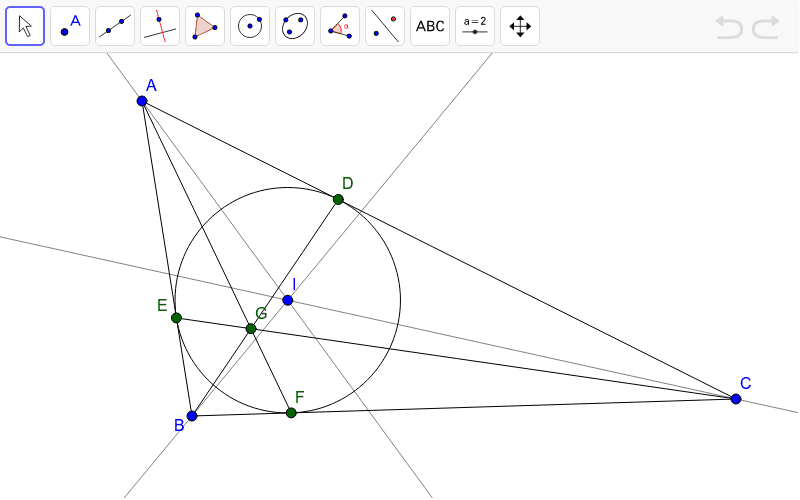
This GeoGebra example demonstrates the incenter (I), the Gergonne point (G), and the incircle as one of the four tritangent circles tangent to all three sides of a triangle. It visually explores the relationships among angle bisectors, the incenter, contact points, and the concurrency of cevians from vertices to contact points. The construction uses GeoGebra commands: Segment to define triangle ABC, AngularBisector to find the incenter, OrthogonalLine and Intersect to locate the touch points D, E, F on the sides, Circle to draw the incircle, and lines connecting vertices to touch points to reveal the Gergonne point. This resource is ideal for high school geometry classes, helping students understand the incenter, incircle, and Gergonne point through dynamic manipulation, and can also serve as a starting point for exploring the family of tritangent circles.
GeoGebra Commands & Parameters
Segment(A, B) → aSegment(B, C) → bSegment(C, A) → cAngularBisector(A, B, C) → dAngularBisector(C, A, B) → eAngularBisector(B, C, A) → fIntersect(d, e) → IOrthogonalLine(I, c) → gIntersect(g, c) → DCircle(I, D) → hIntersect(h, a, 1) → EIntersect(h, b, 1) → FSegment(A, F) → iSegment(E, C) → jSegment(B, D) → kIntersect(i, j) → G
AI Drawing Prompt Reference
Draw a triangle ABC, then draw the three angle bisectors, find their intersection point I as the incenter. Draw a perpendicular line from I to side BC, and find its intersection point D with side BC. Draw a circle with I and D as the radius, which is tangent to the other two sides of the triangle, getting the incircle. Then find the points E and F where the incircle touches sides AB and AC. Finally, draw lines from vertex A to point F, from vertex B to point D, and from vertex C to point E, and their intersection point G is the Gergonne point.
The prompt above was compiled from the original drawing commands and is for reference only.