
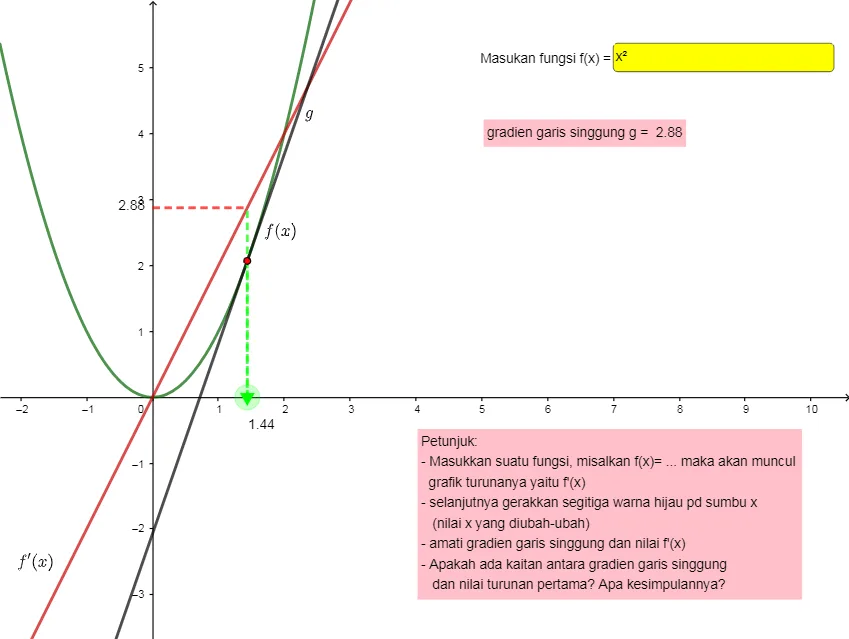
Ilustrasi turunan fungsi (derivative of function)
Loading the math board and drawing, please wait…
GeoGebra Commands & Parameters
Textfield(f) → InputBox1Derivative(f) → pPoint(xAxis) → AOrthogonalLine(A, xAxis) → gIntersect(f, g) → BTangent(B, f) → hIntersect(p, g) → CSegment(D, C) → iSlope(h) → aSegment(A, C) → jSegment(B, A) → kPoint(p) → EPoint(f) → FPoint(h) → G
AI Drawing Prompt Reference
Draw a function and its derivative, showing the geometric meaning of the derivative as the slope of the tangent line. Start by marking an input box for the function expression, then plot the function curve and its derivative curve. Take a point on the x-axis, draw a perpendicular line from this point to the x-axis, and find where it intersects the function curve. From this intersection point, draw the tangent line to the function. Then, find where the perpendicular line intersects the derivative curve, and connect this intersection point to the intersection of the perpendicular line with the x-axis. Finally, label the function curve, derivative curve, tangent line, perpendicular line, the line segment connecting the derivative intersection and the perpendicular intersection, and the line segment connecting the function intersection and the x-axis intersection, and display the slope of the tangent line.
The prompt above was compiled from the original drawing commands and is for reference only.