
Function Derivative Example
Loading the math board and drawing, please wait…
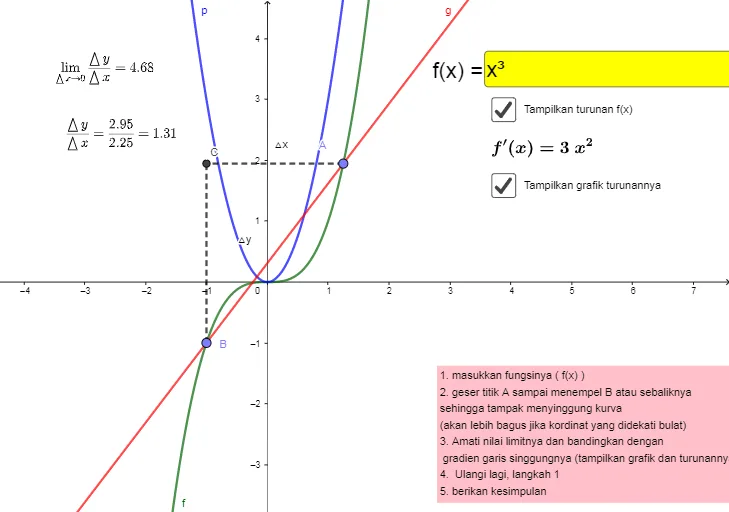
This example illustrates the derivative of a function. It involves the concept of derivatives. Using GeoGebra commands such as Derivative, Point, Line, etc., the tangent and slope of the function can be constructed. Suitable for high school mathematics education and learning.
GeoGebra Commands & Parameters
Derivative(f) → pPoint(f) → APoint(f) → BLine(A, B) → gOrthogonalLine(B, xAxis) → hOrthogonalLine(A, yAxis) → iIntersect(i, h) → CSegment(B, C) → jSegment(A, C) → kTangent(A, f) → lSlope(l) → bTextfield(f) → InputBox1Limit(p, x(A)) → cDerivative(f) → f'OrthogonalLine(A, xAxis) → nIntersect(p, n) → DSegment(A, D) → qSegment(D, E) → r
AI Drawing Prompt Reference
Draw a function graph and its derivative. First, mark two points on the function and connect them to form a line representing the average rate of change between these two points. Then, draw perpendicular lines from these points to the x-axis and y-axis, and connect the intersection of these lines with the original function points. Next, draw the tangent line at one of the points on the function and label its slope. Finally, draw a horizontal line parallel to the x-axis on the derivative curve, mark its intersection with the derivative, and show the line segments formed.
The prompt above was compiled from the original drawing commands and is for reference only.