
Illustration of Volume with Nested Cylinders
Loading the math board and drawing, please wait…
In collections
BC Calculus
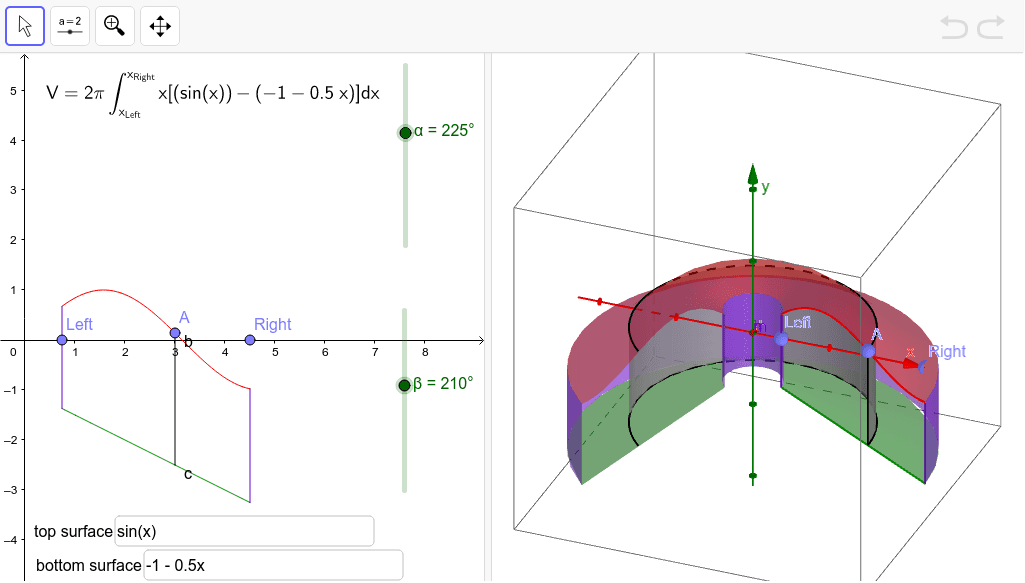
This example demonstrates the volume of a solid using a set of nested cylinders. Key mathematical concepts include solid geometry and integral calculus. Using GeoGebra commands such as Point, Segment, Textfield, Surface, etc., the height and radius of the cylinders can be dynamically adjusted to visually illustrate the volume calculation process. Suitable for high school and above students or teachers.
GeoGebra Commands & Parameters
Point(xAxis) → LeftPoint(xAxis) → RightPoint(f) → ASegment(B, A) → aTextfield(g) → inputBox1Textfield(h) → inputBox2Segment((x(Left), g(x(Left))), (x(Left), h(x(Left)))) → jSegment((x(Right), g(x(Right))), (x(Right), h(x(Right)))) → lSurface((x(A) * cos((-t))), u, (x(A) * sin((-t))), t, 0, β, u, Min[y(A), y(B)], Max[y(A), y(B)]) → dIf(α > 0, Surface[(u * cos((-t))), g(u), (u * sin((-t))), t, 0, α, u, x(Left), x(Right)]) → eSurface((u * cos((-t))), k(u), (u * sin((-t))), t, 0, α, u, x(Left), x(Right)) → iSurface((x(Left) * cos((-t))), u, (x(Left) * sin((-t))), t, 0, α, u, Min[g(x(Left)), h(x(Left))], Max[g(x(Left)), h(x(Left))]) → mSurface((x(Right) * cos((-t))), u, (x(Right) * sin((-t))), t, 0, α, u, Min[g(x(Right)), h(x(Right))], Max[g(x(Right)), h(x(Right))]) → nCurveCartesian((x(A) * cos((-t))), y(A), (x(A) * sin((-t))), t, 0, α) → bCurveCartesian((x(A) * cos((-t))), y(B), (x(A) * sin((-t))), t, 0, α) → cLaTeX((((("\text{V}=2\pi\int_{x_{\text{Left}}}^{x_{\text{Right}}}x\left[\left(" * g) * "\right)-\left(") * h) * "\right)\right] dx")) → text1
AI Drawing Prompt Reference
Draw a set of nested cylinders to illustrate their volume. Start by creating two points on the x-axis to represent the ends of the cylinders. Then create a segment between these points to represent the height of the cylinders. Input two functions to represent the top and bottom bases of each cylinder. Use these functions and points to draw the side surfaces of the cylinders, and finally calculate and display the total volume of these cylinders.
The prompt above was compiled from the original drawing commands and is for reference only.