
Identifying Solid Figures
Loading the math board and drawing, please wait…
In collections
Solid figures
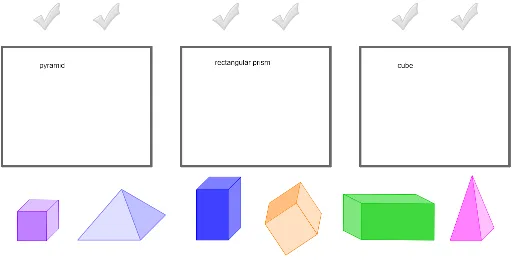
This example demonstrates the identification and construction of solid figures. Key math concepts include solid geometry, polygon construction, and the relationship between points and lines. Construction highlights involve using Polygon, Corner, and Midpoint commands to form shapes, with checkmark objects for marking and verification. Suitable for high school students or as a teaching tool in solid geometry.
GeoGebra Commands & Parameters
Polygon(O_1, P_1, Q_1, R_1) → Vieleck1, o_1, p_1, q_1, r_1Polygon(S_1, T_1, U_1, V_1) → Vieleck2, s_1, t_1, u_1, v_1Polygon(W_1, Z_1, A_2, B_2) → Vieleck3, w_1, z_1, a_2, b_2Corner(pyramideBlau, 3) → EMidpoint(A, E) → FCorner(pyramidePink, 3) → K_2Midpoint(C, K_2) → L_2Corner(prismBlue, 3) → M_2Midpoint(G, M_2) → N_2Corner(prismGreen, 3) → O_2Midpoint(I, O_2) → P_2Corner(cubePurple, 3) → Q_2Midpoint(K, Q_2) → R_2Corner(cubeOrange, 3) → S_2Midpoint(I_2, S_2) → T_2
AI Drawing Prompt Reference
Draw three quadrilateral polygons and label key points. Then, connect the apex of two pyramids to the midpoints of their bases to form auxiliary lines. Similarly, connect the apex of two prisms and a cube to the midpoints of their bases. Combine these auxiliary lines with the polygons to illustrate the relationship between points, lines, and faces in solid geometry.
The prompt above was compiled from the original drawing commands and is for reference only.