
Identify Rotation Information
Loading the math board and drawing, please wait…
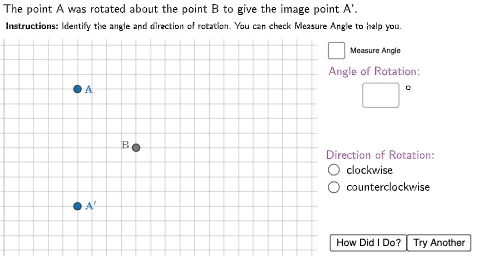
This example demonstrates how to identify rotation information. Key mathematical concepts include rotation, angles, and polygons. Using GeoGebra commands such as Polygon, Rotate, and Angle, you can construct rotated figures and analyze the rotation angles. Suitable for middle school students learning geometric transformations.
GeoGebra Commands & Parameters
Polygon((-2, 14.4), (40, 14.4), (40, 20), (-2, 20)) → TopBox, f, g, h, iPolygon((21.4, 16), (40, 16), (40, -5), (21.4, -5)) → RightBox, j, k, l, mRotate(A, rotangle, B) → A'Angle(A', B, A) → ABA'Segment(A', B) → A'BSegment(A, B) → ABTextfield(usertext) → InputBox1Circle((22.5, 5.5), 0.35) → CCircleCircle((22.5, 4.3), 0.35) → CCCircle
AI Drawing Prompt Reference
Draw a rectangle named TopBox, then rotate it around point A by a certain angle to form another rectangle named RightBox. Measure the rotation angle and display it. Draw two circles, one near point C and another near point C'.
The prompt above was compiled from the original drawing commands and is for reference only.