
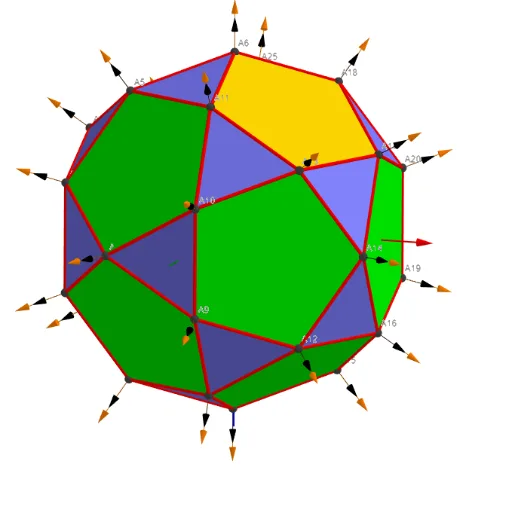
Icosidodecahedron with 30 vertices: sphere-based 3D construction
Loading the math board and drawing, please wait…
This example demonstrates how an icosidodecahedron (a truncated icosahedral-type uniform solid) can be constructed as a 3D structure from a set of points located on a reference sphere, highlighting its spatial symmetry and the fact that it has 30 vertices. Key concepts include truncated/semiregular polyhedron structure, point sets in 3D space, sphere-based geometric visualization, and the use of vector/parameter-style auxiliary quantities to organize geometry and labels. Construction-wise, it uses Sphere to create the spherical reference surface, point objects (e.g., Points00 and related indexed points) to represent the vertex set, and Segments (plus grouped segment objects) to connect vertices into edges; Text/UnicodeToLetter together with TableText, Sum, Zip are used to assemble and display vertex-related information (such as counts and formatted annotations) in the interface. A vector-like set of objects (e.g., lVector1/2/3) and various computed symbols help parameterize or present auxiliary data. Suitable for secondary-to-early university learners studying solid geometry, symmetry of polyhedra, and GeoGebra-based geometric modeling.
GeoGebra Commands & Parameters
UnicodeToLetter(34) → u34Text("" + Um1) → txt_pSum(Flatten[Sequence[Append[Sequence[Element[txt_p, i], i, m01(k), m02(k)], " "], k, 1, 5]]) → txtUm1Zip(Vector[a, a + UnitVector[a]], a, Points00) → lVector1Zip(Vector[a, a + (1.5 * UnitVector[b])], a, Points00, b, Wi_Pc) → lVector2Zip(Vector[a, a + (1.5 * UnitVector[b])], a, Points00, b, Wi_P) → lVector3Sphere((0, 0, 0), 5) → sphTableText(Append["i", 1…n], Append[" \fgcolor{orange}{GM :Δφ_i}, rad", l1w], Append["\fgcolor{magenta}{GC :Δφ_i} , rad", l1cw], "v") → text23rZip(Segment[Element[Points00, y(a)], Element[Points00, z(a)]], a, ll1bb(1)) → ll1Zip(Segment[Element[Points00, y(a)], Element[Points00, z(a)]], a, ll1bb(2)) → ll2Zip(Segment[Element[Points00, y(a)], Element[Points00, z(a)]], a, ll1bb(3)) → ll3Zip(Segment[Element[Points00, y(a)], Element[Points00, z(a)]], a, ll1bb(4)) → ll4Zip(Segment[Element[Points00, y(a)], Element[Points00, z(a)]], a, ll1bb(5)) → ll5Zip(Segment[Element[Points00, y(a)], Element[Points00, z(a)]], a, ll1bb(6)) → ll6Zip(Segment[Element[Points00, y(a)], Element[Points00, z(a)]], a, ll1bb(7)) → ll7Zip(Segment[Element[Points00, y(a)], Element[Points00, z(a)]], a, ll1bb(8)) → ll8
AI Drawing Prompt Reference
Draw an icosidodecahedron constructed from 30 vertices on a reference sphere, highlighting its spatial symmetry. Create a sphere first, then connect the points with lines to form edges. Label each vertex with colored text showing information like angles and indices, using vector-like objects to organize geometry and annotations.
The prompt above was compiled from the original drawing commands and is for reference only.